


 Zornitsa Stefanova
 Zornitsa Stefanova is a Financial Research and Platform Testing Analyst at BestBrokers.com, specialising in hands-on reviews of forex, cryptocurrency and stock trading platforms. She evaluates brokerage companies from a user-focused perspective, testing key areas such as account setup, trading conditions, platform usability, available markets and overall reliability.
 | Expert Editor
  Eugene Lee, CFA
 Eugene Lee, CFA, is the Head of Research at BestBrokers.com, where he draws on more than two decades of experience in global markets, portfolio management, derivatives, and fintech to evaluate online brokers. His background in institutional investing and quantitative research helps ensure that broker reviews are based on data, risk assessment, and real-world trading conditions.
  | Updated:
 Introduction to Trading Orders
A trading order is an official instruction a trader sends to their broker or trading platform to open or close a position in a financial asset under specific conditions. This guide explains the main order types used in trading, including Market orders, Limit orders, Stop orders, Stop Loss orders, and Take Profit orders. In addition to these core foundational orders, we will examine several advanced order variations, such as Stop Limit orders, Guaranteed Stop Losses, and time-in-force instructions, to build a full picture of modern execution frameworks across different global financial markets.
What This Guide Covers
Besides the main order types, this guide also covers:
- The mechanics of order execution: How brokers process requests, the differences between instant and market execution, and the technical distinctions between orders, positions, and deals.
- Price dynamics and trading costs: Analysis of bid/ask spreads and slippage, including how these factors impact your entry and exit prices during periods of high volatility.
- Platform-specific instructions: Step-by-step walkthroughs for placing and managing orders on industry-standard platforms, including MetaTrader 4, MetaTrader 5, and cTrader.
- Asset-class nuances: How order behavior and risks vary across different markets, such as forex, CFDs, stocks, and cryptocurrencies.
- Strategic risk management: Professional methods for calculating risk-to-reward ratios and placing Stop Losses based on volatility or technical support and resistance levels.
- Advanced order management: Guidance on using guaranteed Stop Losses, scaling in or out of positions through partial fills.
- Order duration and expiry: An exploration of time-in-force settings that tell brokers exactly how long an order remains active in the market, or how it should be handled regarding partial executions.
The goal is to show not just what each order is, but how it behaves in live conditions where price, liquidity, and speed can all change.
Who This Guide Is For
This guide is written for individuals at various stages of their trading journey. Whether you are a beginner seeking to understand the mechanics of order execution before risking real money, or an experienced investor transitioning from long-term holdings to active intraday trading, these insights are foundational.
What Readers Will Learn
By the end of this guide, readers should understand what each order type does, when traders commonly use it, and what can go wrong. You will also learn how order behavior can vary by broker, platform, market, account type, product type, session, liquidity, and market conditions.
Note: All examples provided are for educational purposes. They illustrate market mechanics and should not be interpreted as financial advice or a guarantee of future performance.
What Is a Trading Order?
Every active position begins as a digital command. Understanding how a trading order transforms from a button click on your screen into live market exposure is the foundation of precise execution.
Trading Orders Explained
A trading order is a formal digital instruction you send through a trading platform to a broker or execution venue. This instruction explicitly dictates:
- The asset: What financial instrument to trade (e.g., currency pair, stock, or cryptocurrency).
- The direction: Whether to buy (go long) or sell (go short).
- The volume: The size of the trade (lots, shares, or units).
- The conditions: The specific price or time constraints under which the trade must execute.
Some orders are meant to execute immediately, while others wait as “pending” instructions until the price reaches a level you choose. The exact handling of that instruction depends on the market, the product, the platform, and the broker’s order-routing and execution setup.
Orders, Deals, and Positions
These terms are often mixed up by beginners. In modern trading platforms, the terms order, deal, and position represent three distinct phases of a transaction. The table below explains the distinction between the three and gives practical examples.
| Term | Technical Definition | Practical Example |
|---|---|---|
| Order (The Request) | The instruction or request sent to the broker to execute a trade. It represents intent, not an active trade. | You place a pending Buy Limit order on EUR/USD at 1.0800. It sits resting in the broker’s system. |
| Deal (The Action) | The execution or the actual record of a transaction taking place. An order results in a deal once filled. | The market drops to 1.0800. Your order is filled, creating a “deal” (the transaction record). |
| Position (The Consequence) | The market exposure resulting from the deal. This is the active, open trade that fluctuates in value. | You now hold an active long position of 1 lot of EUR/USD, which remains open until you close it. |
The Journey of an Order: from Submission to Execution
When you click buy or sell on your trading application, the order undergoes a multi-step verification and routing process before it impacts the market.
- Platform Pre-Check: The broker’s system automatically audits the incoming order for validity, checking account permissions, market status, and whether you have sufficient margin to back the trade.
- Broker Processing: Depending on the broker’s execution model (Market Maker vs. STP/ECN):
Market Maker
If your broker operates a Market Maker model, they may match the order internally against an opposing client order. If no opposing order exists, the broker takes the other side of your trade, buying from you or selling to you using their own capital.
STP/ECN
If your broker operates a Straight-Through Processing (STP) or Electronic Communication Network (ECN) model, they do not take the risk themselves. Instead, they act as an intermediary, routing your order to the wider market. The order is transmitted instantly to external tier-1 banks, prime brokers, or non-bank market makers. For listed assets like equities or futures, the order is routed directly to the exchange’s central electronic order book, where it matches against an opposing order from another market participant.
The pathway your broker uses directly influences your execution speed, the spread you pay, and your vulnerability to slippage or requotes.
How Order Type Affects Entry, Exit, and Risk
The order type you choose affects how you get into a trade, how you get out, and how much uncertainty you accept. A market order may enter fast, but at a better or worse price than expected because of slippage. A limit order may protect your entry price but never fill. A Stop Loss can help cap planned risk, but fast markets, spread widening, gaps, and low liquidity can still lead to worse-than-expected exits.
Buy Orders and Sell Orders: Market Direction Explained
Every trade begins with a fundamental decision on market direction. Regardless of the complex operational logic applied to a trade later, all platform instructions are built upon two foundational actions:
- Buy orders: A buy order means you want to purchase the instrument, either to open a long position or to close a short one. In practical terms, you are either betting on the price moving higher or covering a previous sell position. The exact meaning depends on whether you currently have no position, a long position, or a short position.
- Sell orders: A sell order means you want to sell the instrument, either to open a short position where allowed or to close a long position. Beginners often assume that “sell” always means exiting, but in many leveraged products, it can also mean opening bearish exposure. Platform order tickets usually show whether you are opening or reducing an existing position.
Going Long vs. Going Short
 Understanding market direction requires mastering the concepts of “long” and ”short” exposures, which dictate how an order behaves across different asset classes.
Going Long (The Bullish Stance)

Going long means buying with the expectation that the price will rise. If the market moves up after entry, the position generally gains value; if it falls, the position generally loses value. Long positions are usually the first type of trade beginners encounter because they are conceptually similar to traditional investing.
A long position can be initiated using a Buy Market order (for immediate entry), a Buy Limit order (to catch a lower pullback price), or a Buy Stop order (to trade a bullish breakout). This is the most intuitive form of trading, as it mirrors traditional investing.
Going Short (The Bearish Stance)

Going short means selling with the expectation that the price will fall, then buying back later at a lower price. Short trading is common in forex, CFDs, futures, and many derivatives, but may be restricted or handled differently in some stock markets and account types. Because losses on short positions can grow quickly in sharp rallies, risk control is essential.
A short position is opened using a Sell Market, Sell Limit, or Sell Stop order. Because asset prices can theoretically rise infinitely, short positions carry a distinct risk profile during sharp market rallies, making strict risk control paramount.
Note: A long position is usually closed by selling, and a short position is usually closed by buying. This sounds simple, but many beginners become confused when platform buttons show buy and sell without clearly labeling whether the action will open or close exposure. Checking the position window, not just the order ticket, helps avoid accidental overtrading.
Common Beginner Mistakes with Buy and Sell Orders
Even experienced traders can occasionally make execution errors during fast-moving market conditions. Novice traders should actively guard against these typical mistakes:
- Executing the wrong order side: Accidentally clicking “Buy” instead of “Sell” when intending to short a market, or vice versa.
- Confusing exits with new entries: Placing a completely new market order to exit an active trade on a platform that supports hedging. This leaves you with two open, opposing positions instead of a closed one.
- Misplacing protective stops: Placing a Stop Loss on the incorrect side of the market (e.g., setting a Buy Stop instead of a Sell Stop to protect a long trade). This can cause the platform to either reject the command or trigger an unwanted entry.
- Overlooking the bid-ask spread: Forgetting that buy orders execute at the higher Ask price while sell orders execute at the lower Bid price. This oversight can lead to unexpected immediate paper losses or premature stop-outs.
- Oversizing the transaction: Deploying a trade volume (lot or share size) that is disproportionate to account equity. Excessive leverage turns normal market noise into an existential account risk, forcing emotional rather than strategic decision-making.
Overview of Four Main Trading Order Groups
To execute trading strategies effectively, market participants can categorize their platform instructions into four distinct functional groups: market, pending, risk management, and advanced orders. These groups allow traders to systematically balance the essential trade-offs of the market: execution speed, price precision, automated risk control, and complex tactical logic.
| Feature/Metric | Market Orders | Pending Orders | Risk Management Orders | Advanced and Conditional Orders |
|---|---|---|---|---|
| Primary objective | Immediate market entry or exit. | Automated entry at a specific price level. | Capital preservation and profit realization. | Managing complex or volatile market scenarios. |
| Execution timing | Executed instantly upon reaching the broker’s server. | Latent; triggers only if the market hits the target price. | Active only when attached to an open, live position. | Triggered when multi-layered conditions are met. |
| Price certainty | Vulnerable to slippage in volatile conditions. | High for Limit orders; variable for Stop orders once triggered. | Variable; converts to market execution upon triggering. | Dependent on the underlying logic (e.g., guarantees price for limits). |
| Key examples | Buy Market order; Sell Market order | Buy/Sell Limit orders; Buy/Sell Stop orders | Stop Loss orders; Take Profit orders; Trailing Stop orders | Stop Limit orders; One-Cancels-the-Other (OCO) |
Note that not every broker or platform supports all these order types (especially trailing stops, OCO, and Stop Limit orders).
Group 1: Market Orders Explained
A market order is an instruction sent to a broker to buy or sell a financial instrument immediately at the best available prevailing price in the market. This order type completely prioritizes execution certainty over price precision.
When you submit a market order, it does not wait for a specific price level to be reached. Instead, it instantly crosses the bid-ask spread to match with the nearest available counterparty orders on the broker’s or exchange’s order book. Because the market is dynamic, the price displayed on your chart at the millisecond you click “Buy” or “Sell” is merely an indication. The actual execution price is determined by the live liquidity available at the exact moment the order hits the execution venue.
Buy vs. Sell Market Orders
- Buy market orders: These requests are executed instantly at the lowest available Ask (Offer) price. Traders deploy buy market orders to immediately establish a new long position or to quickly close out an active short (bearish) position. Entering via the Ask price means you are paying a slight premium for immediate entry.
- Sell market orders: These requests are executed instantly at the highest available Bid price. Traders utilize sell market orders to immediately liquidate an existing long position or to initiate a new short position. Selling at the Bid price means accepting the current buyers’ wholesale price in exchange for instant execution.
The behavior of a market order depends entirely on the direction of your transaction, as it interacts with different sides of the broker’s liquidity pool.
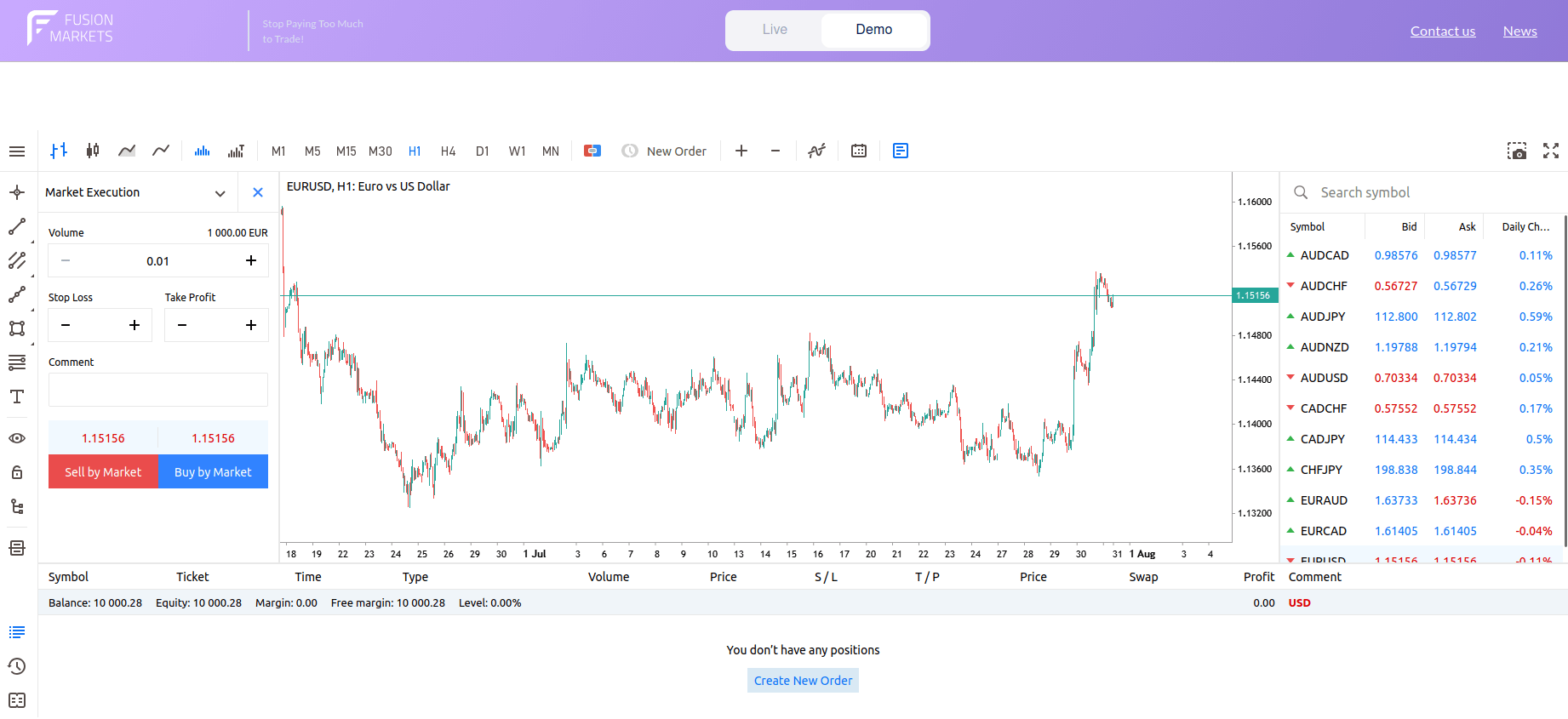
Buy and Sell Market Orders
Execution and Slippage
While market orders prioritize execution speed, they do not guarantee a fixed price. In fast-moving or illiquid markets, orders may experience slippage, filling at a price slightly different from the displayed Ask or Bid rate. Additionally, opening a market order instantly incurs transaction costs via the bid-ask spread. Modern platforms, such as MetaTrader 5 or cTrader) also enforce strict validation rules on market tickets: attached risk parameters like Stop Loss or Take Profit must strictly conform to the order direction (e.g., a Take Profit on a Sell order must sit below the Bid price), or the interface will disable order submission to prevent execution errors.
- The impact of liquidity and volatility: In highly liquid, stable markets (such as major forex pairs during the London/New York session overlap), market orders are typically filled at or incredibly close to the quoted price. However, during periods of low liquidity (market opens, closes, or weekend transitions) or hyper-volatility (high-impact economic news releases), the order book can thin out rapidly.
- Slippage explained: When the available liquidity at the top of the order book is insufficient to cover your order volume, your trade “slips” to the next best available price.
- Negative slippage: Occurs when your order is filled at a less favorable price than anticipated (higher for buys, lower for sells), increasing your immediate trading costs.
- Positive slippage: Occurs when sharp, favorable micro-movements allow your order to execute at a better price than expected.
When Traders Use Market Orders
Traders often use market orders when getting in or out quickly matters more than obtaining a specific price.
- High-liquidity instruments: When trading major equities, heavily traded indices, or liquid currency pairs, where the bid-ask spread is tight and slippage risk is mathematically minimized.
- Urgent position liquidation: When a trade setup is invalidated completely, or an unexpected market event occurs, and the priority is immediate capital preservation over saving a few pips or cents on the exit price.
- Momentum strategies: When a market breaks out of a major structural range with high volume, and the risk of missing the exponential move (omission risk) is fundamentally higher than the risk of experiencing minor entry slippage.
Pros and Cons of Market Orders
Key Pros
- Guaranteed execution: Your order will be filled immediately, provided the market is open, and your account holds sufficient margin.
- Unmatched speed: Eliminates the risk of missing market entries or exits due to resting orders being bypassed.
- Operational simplicity: Ideal for straightforward trade entries and rapid portfolio adjustments on modern trading platforms.
Key Cons
- Zero price control: You cannot specify a maximum buy price or minimum sell price, leaving you vulnerable to poor fill rates.
- Slippage exposure: Highly susceptible to execution gaps during macroeconomic news events or volatile market gaps.
- Higher true costs: Automatically crossing the spread means you incur the full cost of the bid-ask differential right at entry.
Group 2: Pending Orders Explained
A pending order is an automated trading instruction that does not execute immediately. Instead, it waits until the price reaches the level or condition you have defined. Pending orders are useful when you want a planned entry or exit without constantly watching the market.
Instant or immediate execution tries to trade now, while a pending order waits for later. This distinction matters because the trader’s priority changes: immediate execution focuses on speed, while pending orders focus on conditions. A pending order can improve planning, but it can also leave your trade unfilled or trigger at an inconvenient time if the market context has changed.
Types of Pending Orders
Pending orders are divided into two main operational categories, Limit orders and Stop orders, each containing a dedicated Buy and Sell configuration. Their orientation relative to the current market price dictates their strategic function. In simple terms, stops are often used to join movement, while limits are often used to wait for a better price. One favors momentum, the other favors price discipline.
Limit Orders
Limit orders instruct the broker to execute a trade only at the designated limit price or a better one. They are built on the assumption that the market will experience a temporary price retracement before reversing course. A Buy Limit seeks a lower price than the current market, while a Sell Limit seeks a higher price than the current market. This makes limit orders useful when price discipline matters more than immediate execution.
 Buy Limit orders: For instance, in an MT5 Web terminal window trading EUR/USD at 1.15114, a trader might set a Buy Limit order lower down at 1.14063. The order rests in the broker’s system until the market drops to 1.14063 or lower, attempting to secure a discounted entry near visual technical support.
A Buy Limit belongs below the current price because the trader is asking for a cheaper entry than what is available now. Placing it above the current price would usually be invalid or would not serve the purpose of a true Buy Limit. This rule is one of the first checks beginners should learn before placing pending orders. When setting up a Buy Limit in the order ticket, traders specify the volume (e.g., 0.01 lots), target price, and expiration (such as GTC – Good ‘Til Canceled). Once configured, the platform plots a dedicated order line directly on the chart, giving clear visual confirmation of where the entry sits relative to ongoing price action.
The main risks associated with Buy Limit orders are non-execution, partial fills, and entering a market that continues falling. A Buy Limit can feel safer because it seeks a lower entry, but catching a falling market without a clear exit plan can quickly become expensive. A Stop Loss may help define risk, but ordinary stops are still subject to slippage and gap risk.
Common mistakes include placing the order too far away and wondering why it never fills, putting it too close and getting filled by random market noise, ignoring spread, and failing to attach a Stop Loss or Take Profit. Another frequent mistake is leaving a stale Buy Limit active after the original trade idea is no longer valid.
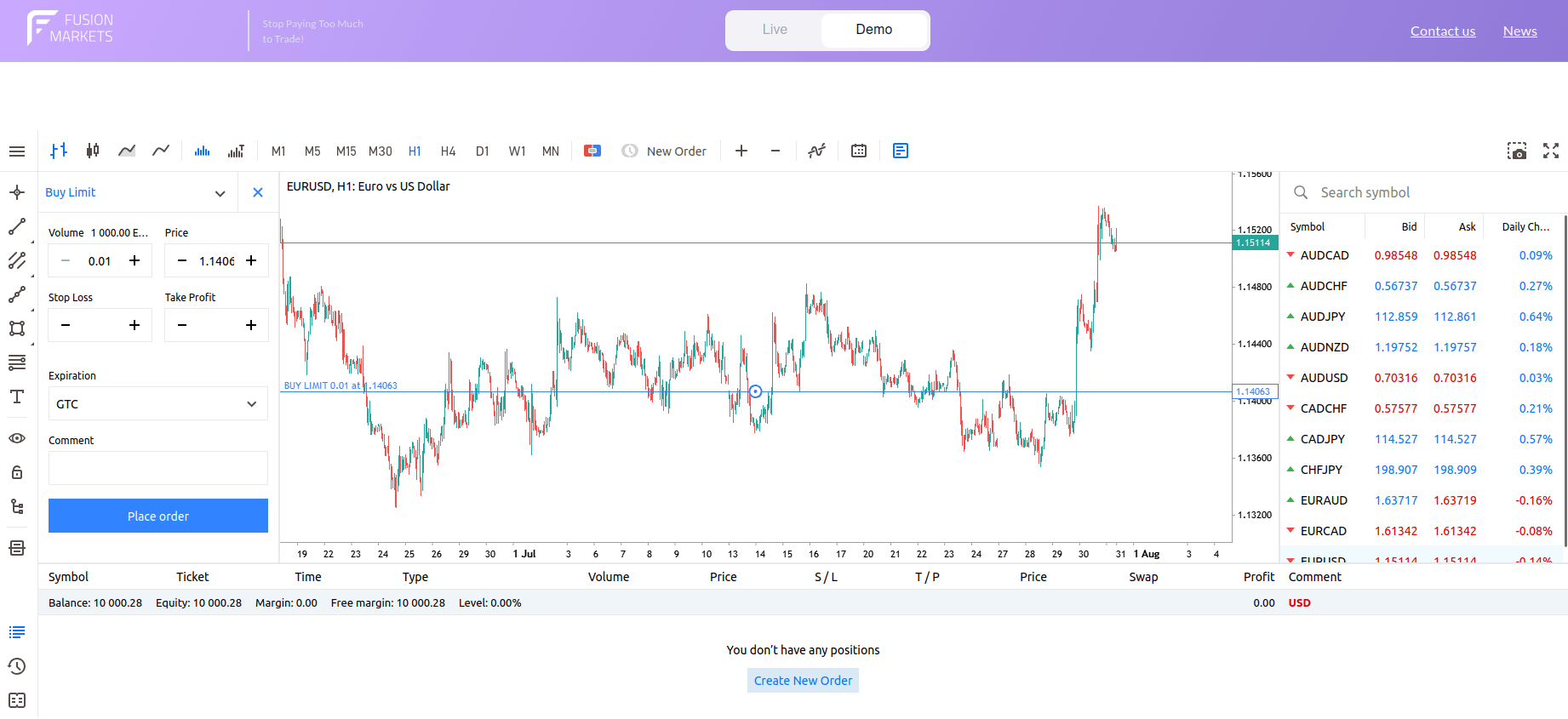
Buy Limit Order
 Sell Limit orders: Buy Stop orders: Positioned strictly above the current market price. For instance, in an MT5 Web terminal window trading EUR/USD at 1.15159, a trader might position a Sell Limit order higher up at 1.15392. The order rests in the broker’s system and activates only if the market Ask price rallies to 1.15392 or higher, aiming to open a short position or liquidate an existing long trade near structural resistance. If the price peaks at 1.15350 and then drops, the order remains unfilled.
A Sell Limit is set above the current market because the trader wants a higher selling price than what is available now. If a beginner places a Sell Limit below the current price, the platform may reject it, or the order may not match the intended strategy. Understanding where each pending order sits relative to the current price is essential.
The main risks associated with Sell Limit orders are missing the trade, getting partially filled, or being filled just before a strong upside breakout. If used for short entries, losses can grow quickly when the price accelerates upward. For that reason, Sell Limits should usually be paired with a planned stop and a position size that fits the account.
Common mistakes include placing the order at obvious round numbers without a reason, ignoring the spread, shorting instruments that are not available for short exposure, and forgetting that the market context may change before the order is reached. Stale pending orders are a frequent beginner problem in all limit-order trading.
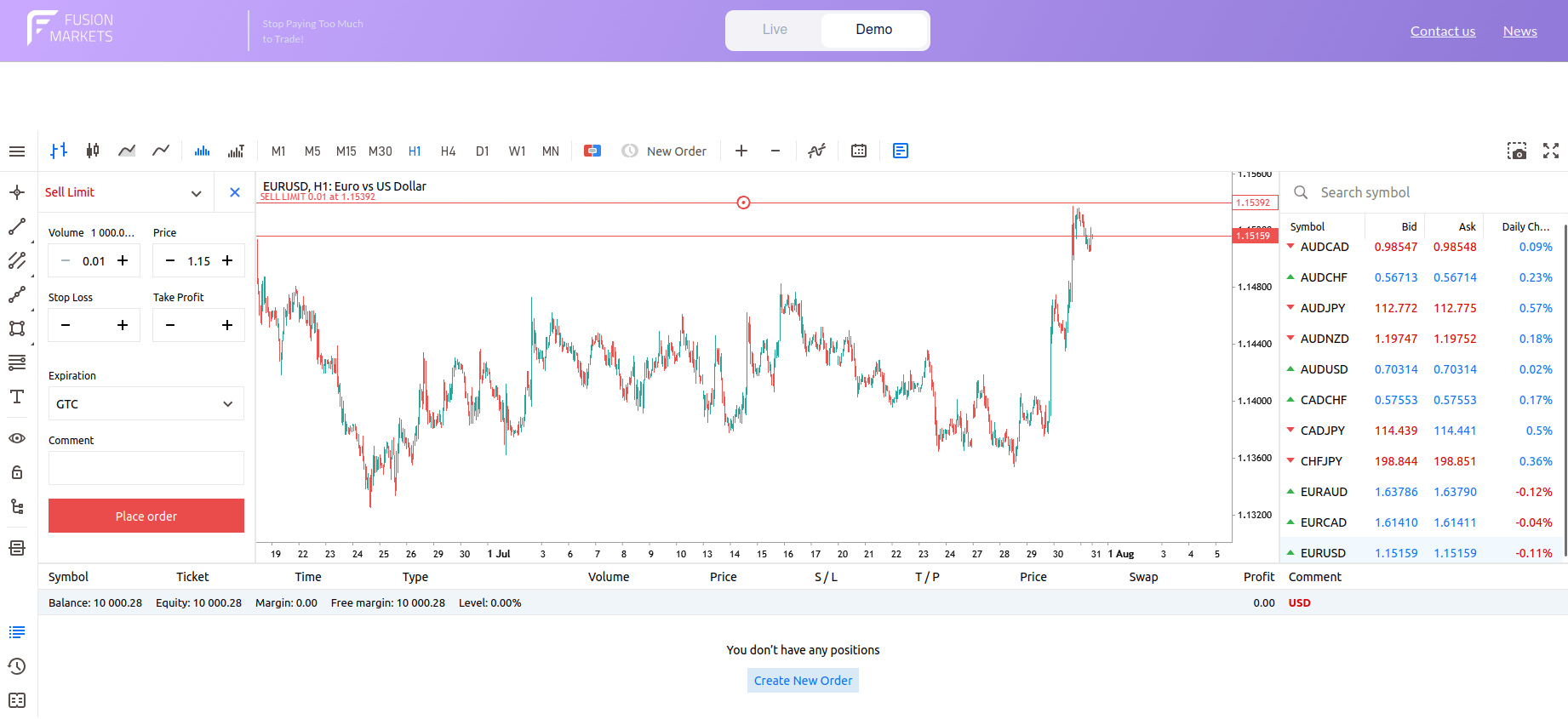
Sell Limit Order
Stop Orders
Stop orders instruct the broker to initiate a trade only after the market proves directional momentum by breaking through a specific threshold. Crucially, once the stop price is touched, the order converts into a standard market order. The stop price acts as a trigger, not a guaranteed fill price. When the market reaches that level, the platform sends the order for execution according to the broker’s and market’s rules. In calm conditions, the fill may be close to the stop level. In fast conditions, gaps or slippage may lead to a different result.
 Buy Stop orders: Positioned strictly above the current market price. For EUR/USD trading at 1.15139, a trader might establish a Buy Stop higher up at 1.15372. This order targets bullish breakout strategies, entering the market only after buyers clear a major overhead resistance level.
A Buy Stop sits above the current price because it is designed to trigger when the market proves strength by moving higher. Placing it below the current price would not match the basic logic of a Buy Stop and will cause the platform to show an error. Beginners should always double-check that the order placement fits the intended direction and strategy.
The main risks associated with Buy Stop orders are false breakouts, poor fills in fast markets, and entering right before the move stalls. Because the order usually becomes executable at the moment momentum appears, it is especially sensitive to news-driven volatility. Beginners should be careful with Buy Stops on leveraged products and highly volatile assets such as crypto or CFDs around major events.
Common mistakes include placing the stop too close to the current price, ignoring nearby resistance, failing to set a Stop Loss, and assuming the trigger level is the guaranteed fill price. Another mistake is leaving a Buy Stop active ahead of economic news without considering spread widening and slippage risk.
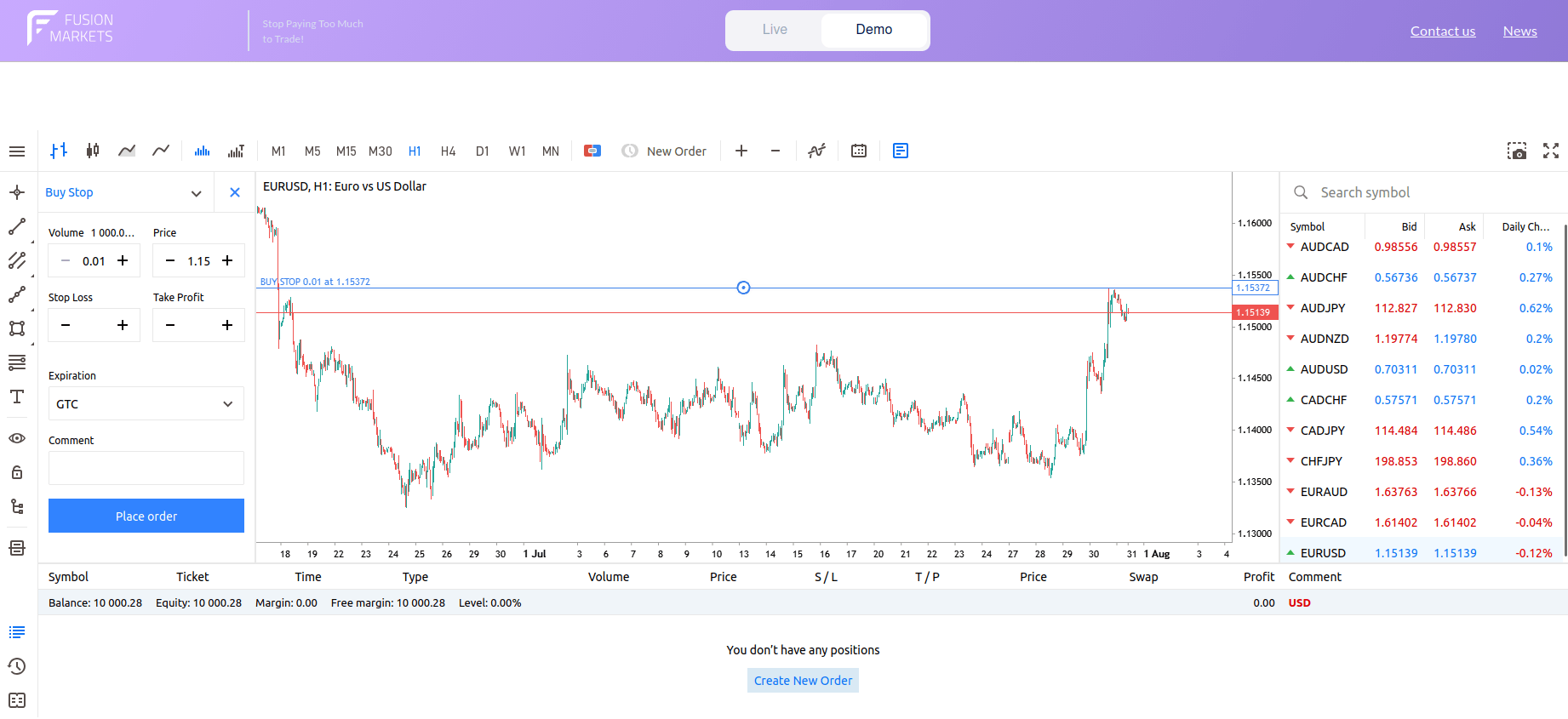
Buy Stop Order
 Sell Stop orders: For EUR/USD trading at 1.15130, a trader might deploy a Sell Stop at 1.14347. This structure targets bearish breakdown strategies or functions as a protective exit, activating a market entry once a major floor of technical support fails.
A Sell Stop belongs below the current price because it is meant to trigger on weakness. If it is placed above the current price, it would not fit the basic logic of a Sell Stop and will cause the platform to show an error. This placement rule is simple, but it prevents many beginner order-entry errors.
The main risks associated with Sell Stop orders are slippage, selling into an exhausted move, and getting trapped in a false breakdown. In stressed markets, stop orders can cascade as many traders are triggered at similar levels, which can worsen fill prices. This is especially important in thin sessions, around major news, or in volatile leveraged products.
Common mistakes include putting the order directly at an obvious support level where many other orders may cluster, ignoring spread, using too large a position, and forgetting that a triggered stop may fill lower than expected. Beginners also sometimes place a Sell Stop when they really meant a Sell Limit.
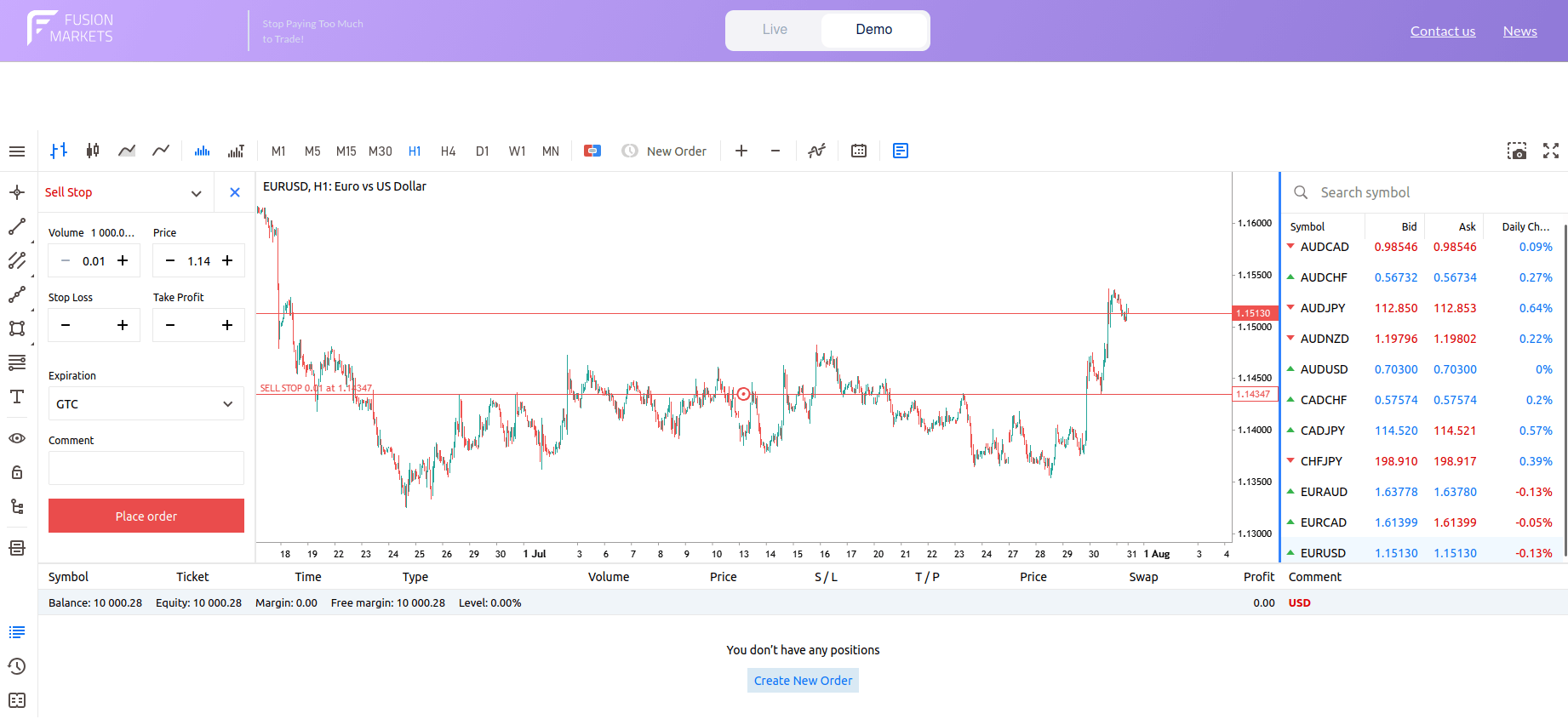
Sell Stop Order
Execution
The limit price is the worst price you are willing to accept, not a promise that the whole order will fill there. For a Buy Limit, it is the maximum acceptable price. For a Sell Limit, it is the minimum acceptable price. Better prices are possible, but no trade should occur at a worse one if the order is handled as a true limit order. If the market briefly touches your limit price of 1.14063 during a low-liquidity session, the order may be partially filled (only a fraction of your target volume is matched) or remain completely unfilled.
Partial fills happen when only part of the order can be matched at the chosen price. This is more common in markets with visible order books, thinner liquidity, larger order sizes, or during fast moves. Depending on the platform and market, the remainder may stay pending, be canceled, or follow other order instructions.
The stop price is the level that tells the platform when to activate the order. It should not be confused with the final fill price. Beginners often assume that putting a stop at a certain number guarantees execution at that number, but ordinary stops do not work that way in all conditions. The moment the market trades at or through your stop price (e.g., 1.15372 on a Buy Stop), the instruction converts into a market order. If the market gaps over your level due to a news release, or if liquidity clusters disappear, your final fill price can slip significantly beyond your trigger level, resulting in negative slippage.
Pending Order Expiry and Cancellation
Many platforms let you choose whether a pending order stays active until canceled, expires at the end of the day, or expires at a chosen date and time. Expiry matters because a level that made sense this morning may no longer fit the market later. Order duration options vary by platform, broker, and instrument.
Pending orders can usually be canceled from the orders tab, trade window, chart, or mobile order list. Before canceling, it helps to double-check whether the order is linked to another order, such as a One-Cancels-the-Other (OCO) setup or a bracket around an open position. Canceling the wrong pending order can leave a live trade without planned protection.
When Traders Use Pending Orders
- When to use a Buy Limit order: Traders often use a Buy Limit when they expect support to hold, want to enter after a retracement, or want better price control than a market order offers. It can also help avoid impulsive entries after a sudden rally. The trade-off is that strong markets may continue upward without ever returning to the order level.
- When to use a Sell Limit order: Traders often use a Sell Limit when they expect resistance to hold, want to sell a rally in a downtrend, or prefer a better exit price on an existing long trade. It is useful when patience matters more than immediate execution. The drawback is that the price may turn lower before the order is reached.
- When to use a Buy Stop order: Traders use Buy Stops when they want confirmation that the price is moving higher before entering. This can help avoid buying too early in a weak market. The trade-off is that entry happens later and often at a higher price than a pullback entry.
- When to use a Sell Stop order: Traders use Sell Stops when they want confirmation that the market is moving lower before they enter short exposure or when they want to automate a protective exit from a long trade. It can help avoid selling too early. The downside is that the trader may enter only after the price has already moved a meaningful distance.
Pros and Cons of Pending Orders
Regardless of whether you use a Limit or a Stop, all pending orders share the same foundational pros and cons:
Pros of Pending Orders
- Algorithmic automation: You do not need to monitor the charts 24/7. Your platform acts as an automated agent, executing your strategy the moment your conditions are met.
- Reduced emotional interference: By hardcoding your entries and exits into the server, you remove the urge to make impulsive, fear-driven decisions during live market fluctuations.
Cons of Pending Orders
- Administrative overhead: They require active management. A pending order placed based on a morning analysis may become a liability by the afternoon if market fundamentals shift.
- Stale order risk: Failing to cancel orders that no longer fit your current strategy can lead to accidental “surprise” fills during periods of high volatility or news releases.
Group 3: Risk Management and Exit Orders Explained
Risk management orders are essential strategic tools attached to an open position to automate the exit process. Their primary function is to enforce discipline, ensuring that capital preservation and profit realization occur systematically rather than through emotional, manual intervention.
Stop Loss Orders Explained
A Stop Loss order (SL) is a protective instruction intended to close an open position if the market price moves against you beyond a predetermined threshold. It is one of the most widely used risk-control tools in trading.
Once traders enter a position, the Stop Loss order rests as a dormant instruction on the broker’s server. If the market price touches your trigger level, the platform instantly converts the instruction into a market order to liquidate the position. Because the execution relies on available liquidity at the moment of the trigger, traders must account for slippage – the potential difference between the trigger level and the final execution price.
Let us now see how Stop Loss Orders are placed with buy and sell positions:
- Long positions (buy): The Stop Loss is placed below your entry price. If the market falls to this level, the platform triggers a sell order to close your long position, capping the downside exposure.
- Short positions (sell): The Stop Loss is placed above your entry price. If the market rallies to this level, the platform triggers a buy order to “cover” or close your short position, limiting losses from an adverse upward move.
On most platforms, the Stop Loss trigger is dictated by the Bid or Ask price. Widening spreads during high-volatility events can trigger a Stop Loss even if the mid-price has not hit your level. Always verify whether your broker triggers stops based on the Bid or Ask to avoid premature stop-outs.
Traders rarely use a “one-size-fits-all” approach to Stop Loss distance. Instead, they choose a methodology based on the market’s current behavior:
- Fixed Stop Losses
A fixed Stop Loss uses a set distance, such as a certain number of points, ticks, cents, dollars, or pips. This approach is simple and easy to apply consistently, but it may ignore current volatility or chart structure. A stop that is too tight may be hit by normal noise, while one that is too wide may increase the planned loss.
- Percentage-based Stop Losses
A percentage-based Stop Loss defines risk as a percentage move in price or a percentage of account capital at risk. This can help standardize planning across trades. The key is to distinguish between a percentage move in the asset and a percentage of your account balance, since these are not the same thing.
- Support and resistance Stop Loss
Some traders place a stop beyond a support or resistance level that would invalidate the setup if broken. This ties the stop to actual chart logic rather than an arbitrary distance. The weakness is that obvious levels often attract clustered stops, and brief spikes through them are common.
- Volatility-based Stop Losses
A volatility-based Stop Loss adjusts distance according to how much the market normally moves. Traders may use indicators or recent price ranges to estimate this. The idea is to give the trade enough room during active conditions without using the same stop size on every market. It is more adaptive, but also more complex.
- Moving average Stop Losses
Some traders use a moving average as a trailing or invalidation reference, placing the stop beyond it or exiting if the price closes through it. This can work in trending markets, but moving averages are lagging tools and may be poor guides in choppy conditions. They should be used as part of a tested method, not as a default rule.
- Time-based Stop Losses
A time-based stop exits the trade after a certain period if the price has not behaved as expected. This can be useful for strategies where timing matters, such as intraday setups that should move relatively soon after entry. It reminds traders that risk is not only about price distance, but also about opportunity cost and changing market context.
Note: While a Stop Loss is vital for risk mitigation, it does not eliminate risk entirely. In standard market conditions, your Stop Loss will execute at the best available market price. However, during weekend price gaps or extreme volatility, a standard Stop Loss cannot guarantee an exit at your exact trigger level. Only Guaranteed Stop Loss Orders (GSLOs), a specific premium service offered by some brokers, provide an absolute guarantee of execution at your specified price, regardless of market gaps.
When a guaranteed stop is supported and correctly placed, the broker agrees to honor the specified exit level according to that product’s terms. This can protect against gap risk that would normally affect an ordinary stop. However, the rules around minimum distance, eligible markets, modification, and activation vary by broker and product.
Guaranteed Stop Loss orders may involve extra costs or wider constraints, depending on the broker and product. For example, there may be a separate premium, specific minimum distances, or limits on where the stop can be placed. The details are not standardized, so traders should always check the exact terms for the instrument they are trading.
While brokers typically charge a small premium for this feature, regulatory frameworks enforced by top-tier watchdogs such as CySEC in Europe and the FCA in the UK heavily emphasize price transparency and negative balance safeguards for retail accounts.
The availability of this premium service varies by broker, platform, market, product type, and account type. Some platforms may show the option only on selected symbols, while others may not support it at all. Traders should verify support directly in the order ticket and read the product rules before assuming the feature exists.
Take Profit Orders Explained
A Take Profit order (TP) is a conditional exit instruction that automatically liquidates a position the moment the market hits your predetermined profit objective. Unlike a Stop Loss, which is designed to prevent a catastrophe, a Take Profit is a tool designed to secure gains. It transforms a “floating” profit into realized capital, ensuring you exit the market before a reversal erodes your hard-earned gains.
The placement of a Take Profit depends entirely on the direction of your trade relative to market price movement:
- Take Profit on buy positions: For a buy position, the Take Profit is usually placed above the entry price because the trader wants to sell and lock in gains if the price rises to a target. On many platforms, the trade is closed on the bid side, so the visible chart price and the actual trigger side can matter. Beginners should always confirm how their platform handles this.
- Take Profit on sell positions: For a sell position, the Take Profit is usually placed below the entry price because the trader wants to buy back the position at a lower price. On many products, the ask side is relevant for closing shorts. This is one reason why spread can affect whether a Take Profit order is reached.
An arbitrary Take Profit target is essentially a guess. Experienced traders anchor their targets in market logic to increase the statistical possibility of success:
- Fixed-pip Take Profit: A fixed-pip or fixed-point Take Profit closes the trade after a chosen gain distance. This is simple and easy to backtest, but it may not fit all market conditions equally well. A target that works in one environment can be too ambitious or too conservative in another.
- Percentage-based Take Profit: A percentage-based Take Profit uses a chosen percentage move in price or account return target as the exit point. This can help standardize planning across different instruments. Still, it should be checked against actual market behavior so the target is not disconnected from realistic movement.
- Support and resistance Take Profit: Many traders set Take Profit levels near prior highs, lows, resistance, support, or measured chart zones. This ties the target to areas where price may react. The weakness is that these levels are not exact, so taking profit slightly before or within a zone may sometimes be more practical than aiming for a single precise number.
- Risk-to-Reward ratio: Perhaps the most important metric, the risk-to-reward ratio compares your potential loss (Stop Loss distance) against your potential gain (Take Profit distance). For example, a 1:2 ratio means for every $1 you risk, you are targeting a $2 gain.
- Volatility-based targets: Utilizing indicators like Average True Range (ATR) or Fibonacci extensions to identify “exhaustion points” where a market move is likely to conclude.
- Partial profit taking: Partial profit taking means closing part of the position at one target and leaving the rest open for a possible larger move. This can reduce emotional pressure and bank some gains early. The trade-off is that the remaining size is smaller, so a later extended move contributes less to overall profit.
- Scaling out of positions: Scaling out is a broader version of partial profit taking in which the position is reduced in stages at multiple levels. This can make trade management smoother in trending markets. It also creates more complexity, and if the method is not planned in advance, it can turn into inconsistent decision-making.
Trailing Stop Orders Explained
A trailing stop is a Stop Loss order that moves in the trader’s favor as the price moves favorably, while typically not moving back if the price reverses. It is designed to protect part of an unrealized gain. The specific trailing method and whether it runs server-side or locally can vary by platform and broker.
Instead of staying fixed, a trailing stop follows the market by a set distance or percentage. If the market keeps moving in the profitable direction, the stop adjusts. If the price reverses enough to hit the trailing level, the position is closed according to the order rules for that product and market.
Choosing the right trailing logic depends on the specific instrument’s volatility profile and your overall trading strategy:
- Fixed-distance Trailing Stops: A fixed-distance trailing stop uses a constant distance, such as a set number of points, ticks, or pips. This approach is simple and easy to understand. The weakness is that the same distance may be too tight in a volatile market and too loose in a quiet market.
- Percentage-based Trailing Stops: A percentage-based trailing stop moves according to a percentage of the price. As the market rises or falls in your favor, the trailing level adjusts by that percentage. This can scale more naturally across instruments with different price levels, though it still may not reflect changing volatility very well.
The trailing mechanism mirrors the direction of your trade, acting as a “floor” for longs and a “ceiling” for shorts:
- Trailing Stops on buy positions: For a buy position, the trailing stop usually moves upward as the price rises. If the price later drops back by the chosen distance, the position is closed. This can help protect gains, but in choppy markets, a trailing stop may be hit repeatedly by normal pullbacks.
- Trailing Stops on sell positions: For a sell position, the trailing stop usually moves downward as the price falls. If the price rebounds by the trailing amount, the short position is closed. As with long positions, short trades can be exited too early if the trailing distance is not well matched to the market’s normal behavior.
When Traders Use Risk Management and Exit Orders
- Stop Loss orders act as essential circuit breakers, defining your maximum acceptable loss before you enter a trade. They prevent small market fluctuations from spiraling into catastrophic account drawdowns, though they require careful placement to avoid being triggered by standard market noise.
- Take Profit orders facilitate disciplined automation. The main downside is that it can close a trade before a larger trend continues, especially if the target is too conservative. For beginners, the key is to set targets intentionally rather than placing them at arbitrary round numbers.
- Trailing stops can be useful when a trader wants to stay with a trend while gradually protecting more of the open profit. They may work better in strong directional markets than in sideways ones. Still, they do not guarantee an exit price and should not be treated as a substitute for position sizing or broader risk management.
Pros and Cons of Risk Management and Exit Orders
When viewed as a unified toolkit, risk management and exit orders provide the essential infrastructure for professional trading. However, they are not a “set-and-forget” solution. Here is an evaluation of these orders as a collective strategy.
Pros of Risk Management and Exit Orders
- Disciplined execution: Removes emotional decision-making by forcing an exit based on pre-set logic rather than hope or fear.
- 24/7 Market coverage: Allows traders to protect capital and lock in profits without the physical need to monitor charts continuously.
- Scalable risk control: Enables precise position sizing and “Risk-to-Reward” planning, providing a mathematical edge to every trade.
Cons of Risk Management and Exit Orders
- Execution gaps: In volatile markets, these orders cannot guarantee an exact price, leaving them vulnerable to slippage.
- Administrative complexity: Requires constant adjustment as the market evolves; stale orders can lead to unintended, suboptimal exits.
- The illusion of safety: Over-reliance on automation can lead traders to ignore underlying market changes until it is too late.
Group 4: Advanced and Conditional Orders Explained
Advanced orders utilize multi-layered instructions, allowing you to link entry conditions with price-control boundaries. These orders are designed for complex environments, such as high-volatility breakouts or scenarios where you must strictly manage the cost of execution.
Stop Limit Orders
A Stop Limit order uses two prices: a stop price that activates the order and a limit price that controls the worst acceptable price afterward. This order type aims to combine the trigger logic of a stop with the price control of a limit. It is more precise than a plain stop order, but it is also less certain to execute.
- The stop price: Once the market hits this price, the order is “woken up” and released into the market.
- The limit price: This is the price boundary for execution after the trigger. Once the stop price is triggered, the order becomes a limit order, ensuring your order is never filled at a price worse than your limit.
Operational application of Stop Limit orders:
- Buy Stop Limit orders: A Buy Stop Limit order is placed above the current market and is triggered when the price rises to the stop level. Once triggered, it becomes a Buy Limit order with a maximum acceptable purchase price. This can help avoid paying too much during a fast breakout, but it may also leave the order unfilled if the price jumps past the limit.
- Sell Stop Limit orders: A Sell Stop Limit order is placed below the current market and is triggered when the price falls to the stop level. Once triggered, it becomes a Sell Limit order with a minimum acceptable selling price. This can prevent selling too low in a sharp drop, but it carries the same risk of no execution if the market moves too quickly.
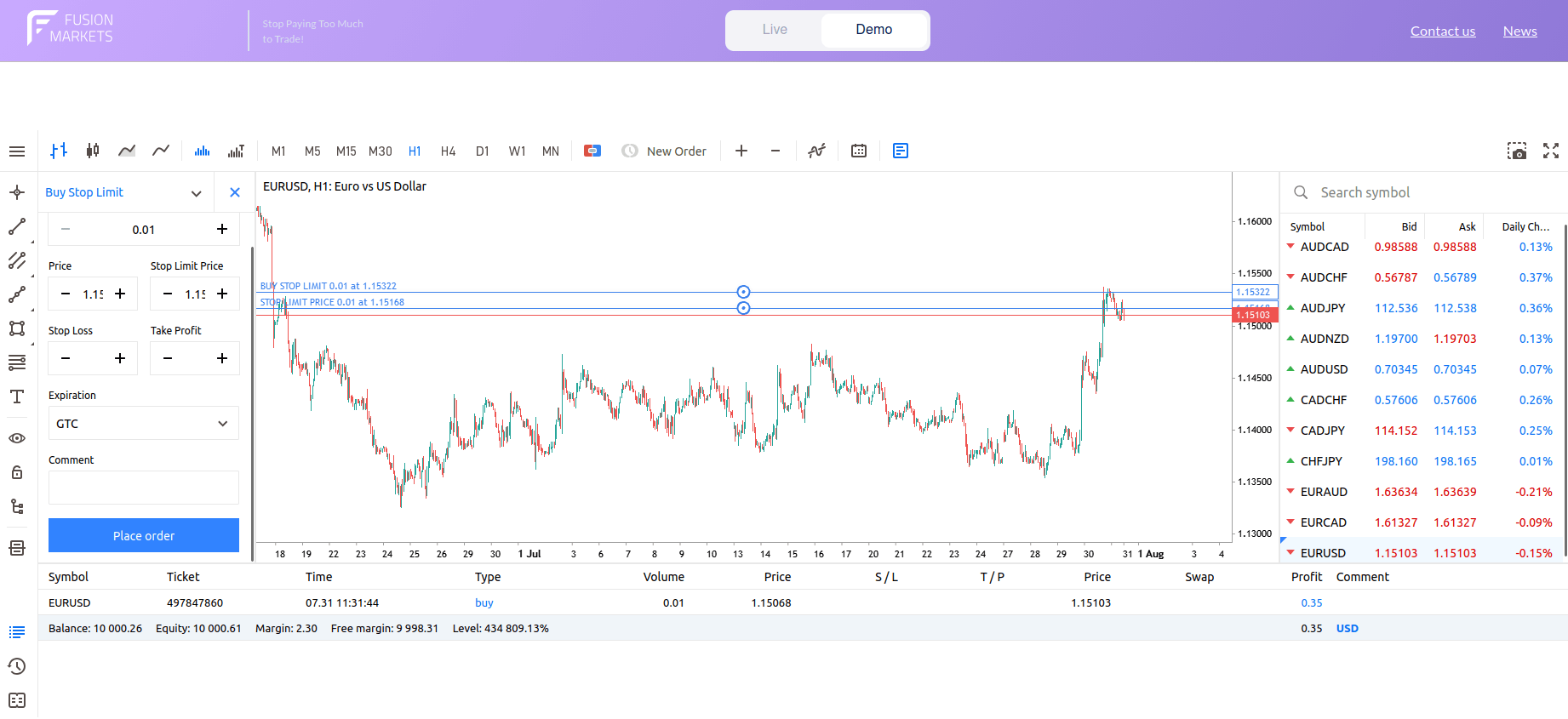
Buy Stop Limit Order
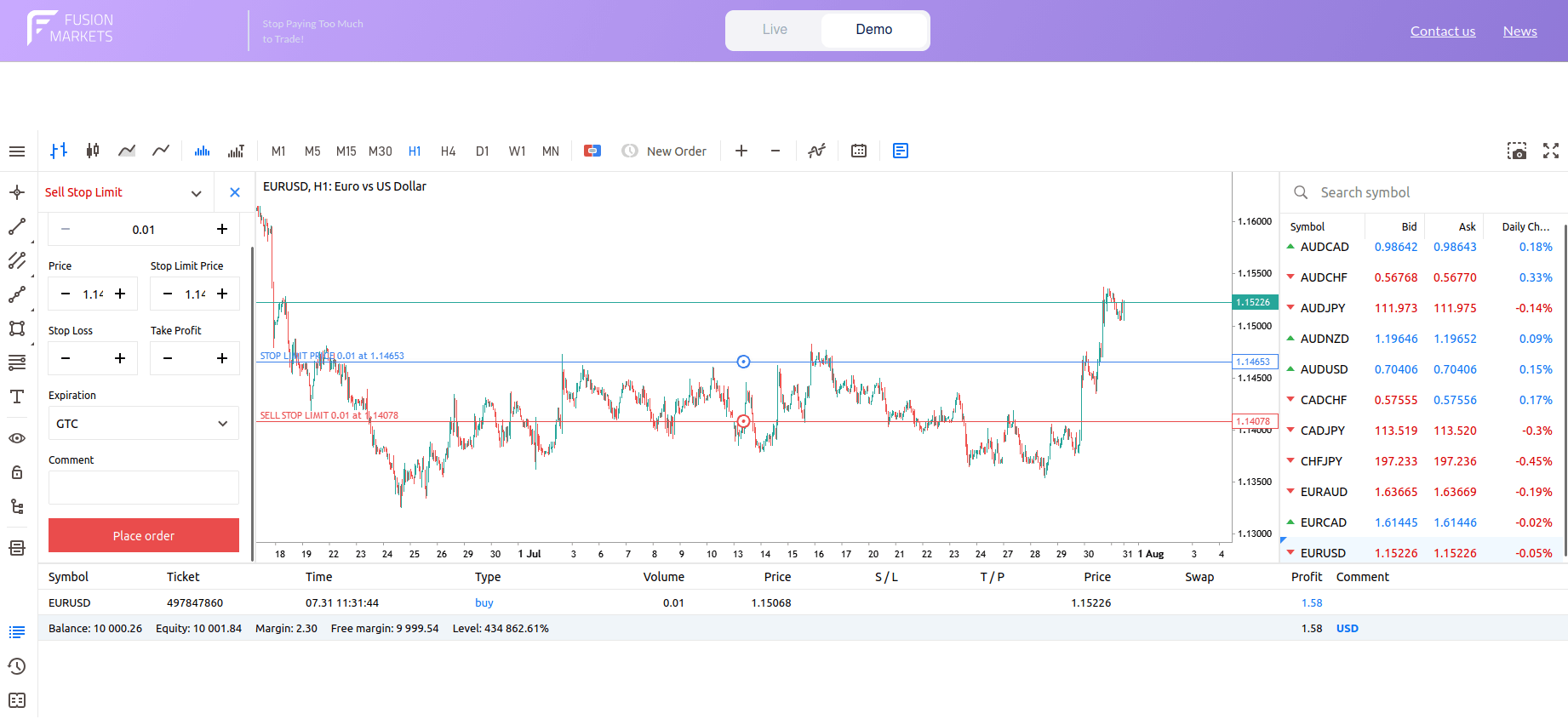
Sell Stop Limit Order
Stop Limit Orders vs. Stop Orders
A plain stop order prioritizes being triggered and then getting executed, even if the fill price differs because of slippage. A Stop Limit order adds price protection after the trigger, but that protection can prevent the trade from happening. In short, stop orders usually offer higher execution certainty, while Stop Limit orders offer higher price control.
The biggest risk associated with Stop Limit orders is non-execution after the stop is triggered. That can be especially dangerous if the order is being used as protection rather than as an entry. For beginners, Stop Limit orders are often misunderstood because they seem safer, yet they can leave a trader exposed precisely when the market is moving fastest.
One-Cancels-the-Other Orders
A One-Cancels-the-Other Order (OCO) is a conditional order structure that links two separate pending instructions together. The core mechanism is straightforward: the execution or activation of one order instantly triggers the automatic cancellation of the other.
In a typical OCO setup, the trader places two linked orders around price or around an open position. Once one order becomes active or fills, the system removes the other to avoid conflicting actions. The exact cancel timing, supported order combinations, and edge-case behavior can vary by platform and market.
Strategic Applications of OCO Orders:
- Stop Loss and Take Profit as OCO orders: A common use of OCO is linking a Stop Loss and a Take Profit around an open trade. If the Stop Loss is hit first, the Take Profit is canceled. If the Take Profit is reached first, the Stop Loss is canceled. This creates a cleaner exit structure, but traders should still verify that the linked orders are actually live and working as intended.
- Buy Stop and Sell Stop: Some traders use OCO orders to place a Buy Stop above the market and a Sell Stop below it, aiming to catch whichever breakout happens first. This can be helpful around consolidation patterns. The risk is that fast whipsaws can trigger one side and then reverse quickly, especially during news or low-liquidity periods.
- Range trading with OCO orders: In some cases, traders use OCO structures for range trading, such as pairing a Buy Limit near support with a Sell Limit near resistance, or combining entry and exit instructions. This requires careful thought because a range can break unexpectedly. Using OCO does not remove the need for stop placement, sizing, and market context.
OCO orders can reduce manual errors, but they also create extra complexity. If the platform connection fails, the order structure is misunderstood, or only one leg is accepted, the trader may assume there is protection when there is not. For beginners, it is important to confirm exactly how the platform defines “triggered,” “filled,” and “canceled.”
Not all brokers or platforms support OCO orders in the same way, and some may only support them on selected markets or account types. In other cases, similar functionality may appear under different names, such as bracket orders or advanced protection. Traders should always check the order ticket and order list rather than assuming the feature works identically everywhere.
When Traders Use Advanced and Conditional Orders
- Stop Limit orders: Traders may use Stop Limit orders when they want breakout-style logic but do not want to accept unlimited slippage beyond the trigger. They can be useful in fast markets, thin books, or for larger orders where price control matters. However, they are more advanced than standard stops and should be tested carefully before live use.
- OCO orders: Traders use OCO orders to automate alternative entry and exit strategies without needing to monitor live charts continuously. They are most frequently deployed as “bracket exits,” linking a Stop Loss and a Take Profit around an open trade to ensure that when one target is hit, the other is instantly deleted. Additionally, traders use them to capture market breakouts by placing opposing buy and Sell Stop orders around a tight consolidation range, or to fade range boundaries using linked buy and sell limit orders. This automated cleanup process is crucial for preventing forgotten resting orders from accidentally triggering new, unauthorized positions later.
Pros and Cons of Advanced and Conditional Orders
Below, we take a look at the pros and cons of advanced and conditional order types.
Pros of Advanced and Conditional Orders
- Establish rigid boundaries (like the limit parameter in a Stop Limit), ensuring you never pay a “panic price” during a sudden market spike.
- Allow traders to map out and simultaneously deploy contingency plans for opposing market directions (e.g., OCO breakouts).
- Automated cancellation mechanics ensure that unhit secondary orders are cleanly purged from the broker’s server, preventing accidental entries later.
Cons of Advanced and Conditional Orders
- Prioritizing price over execution means your order might be left entirely unfilled if market momentum surges past your set limits.
- In highly volatile conditions, price noise can trigger an entry, cancel the protective alternative, and instantly reverse against you.
- Relies heavily on stable server connections and consistent platform architecture, which varies significantly between different brokers.
Order Duration and Expiry
Order duration, often referred to as Time-in-Force (TIF), is a critical component of professional risk management rather than a minor technical setting. A trade setup is entirely dependent on its market environment. If the market regime shifts before your order triggers, a once-valid entry setup can easily become a high-risk liability. Failing to manage expiry settings is a frequent error that leaves traders exposed to unexpected fills on stale orders.
Orders According to Execution Lifespan
Standard Time-Based Expiry Types:
- Day orders: A day order remains active only for the current trading session and is canceled automatically if not filled by the end of that session. This can be useful for traders who do not want overnight exposure or stale entries. The exact definition of “day” depends on the market’s session schedule and platform time settings.
- Good Till Cancelled (GTC) orders: A GTC order remains active until it is filled or manually canceled, subject to any platform or broker limits. It is useful for multi-day planning, but it can also become stale if market conditions change. Some systems use the term broadly, even though orders may still expire after a maximum period.
- Good Till Date orders (GTD): A GTD order remains active until a specific date and time chosen by the trader. This helps avoid forgotten pending orders sitting in the market longer than intended. It is often useful when a setup is tied to a particular session, chart pattern, or event window.
Immediate Execution Variants
- Immediate or Cancel orders (IOC): An Immediate or Cancel, or IOC, order attempts to execute immediately, and any unfilled portion is canceled. This can be useful when partial execution is acceptable, but waiting is not. IOC instructions are not supported everywhere, and behavior can differ across markets and order books.
- Fill or Kill orders (FOK): A Fill or Kill, or FOK, order must be filled completely and immediately, or else canceled in full. This is stricter than IOC because partial fills are not accepted. FOK orders can be useful when the exact size matters, but they reduce the chance of execution and are not available on every platform or product.
Expiry Settings on Trading Platforms
Trading platforms may show expiry choices as GTC, GTD, Day, session-based expiry, or custom time settings. Some platforms also limit available expiry types based on symbol, product type, or order type. It is worth checking platform time zones carefully, especially when placing orders around market opens, closes, or economic releases.
Why Order Duration Matters
Order duration matters because a valid trade idea can become invalid with time. A pending order left active too long can trigger in a completely different market environment than the one you originally analyzed. This is a common beginner mistake and one reason why expiry is part of risk management, not just a technical setting.
| Order Type | Execution Mechanism | Strategic Application | Primary operation Risk |
|---|---|---|---|
| GTC (Good ‘Till Cancelled) | Remains active on the order book until filled or manually deleted. | Long-term investing; multi-week trend breakouts or structural support fills. | Stale Order Fills: Market fundamentals shift around a forgotten order, triggering a toxic entry. |
| GTD (Good ‘Till Date) | Automatically purged at a designated date and timestamp. | Event-driven setups; trading around earnings windows or specific macro releases. | Time-Zone Mismatches: Miscalculating platform server time can result in unexpected, premature expiration. |
| Day order | Automatically canceled at the conclusion of the current trading session. | Intraday day trading; eliminating overnight gap risk and swap fee exposure. | Missed Execution: Fast-moving target trends may trigger right after the session close, leaving you out of the move. |
| IOC (Immediate-or-Cancel) | Fills any immediate liquidity available at the target price; deletes the rest. | Executing large blocks in liquid markets where immediate partial fill is acceptable. | Incomplete Position Size: Leaving the trader with an undersized allocation that disrupts the risk model. |
| FOK (Fill-or-Kill) | Mandates full volume execution instantly, or cancels the entire order. | High-frequency scalping or precise arbitrage models where exact size is mandatory. | High Rejection Rates: In thin markets, a minor liquidity shortfall will trigger a complete cancellation. |
Order Execution Explained
This section breaks down the mechanics of order execution, exploring the different processing models, speed variables, and structural frictions that determine how a digital instruction becomes a live trade.
What Order Execution Means
Order execution is the process of turning your order instruction into an actual trade. Once an order is submitted, it undergoes validation, routing, matching against liquidity providers, and confirmation. The ultimate quality, speed, and price of an execution are determined by a combination of the broker’s infrastructure (Dealing Desk vs. No-Dealing Desk), market liquidity, asset volatility, and network latency.
Execution Models
- Market execution: The order is filled at the best available price when it reaches the market, without requesting confirmation of the exact quoted price first. This model guarantees execution certainty (the trade will open or close) but does not guarantee the price. In fast-moving or thin markets, this leads to slippage (the discrepancy between the requested price on the screen and the actual fill price).
- Instant execution: The platform tries to fill at a quoted price, and if that price is no longer available, the trader may receive a new quote instead. This can give more visible price negotiation, but it can also lead to requotes in moving markets. Terminology can vary between platforms and brokers.
- Request execution: Request execution usually involves asking for a quote and then sending the order based on that quote. It can provide extra confirmation before entry, but it is less practical in very fast markets where prices update quickly. Not all platforms use this terminology, and the exact workflow may differ.
- Exchange execution: The order is sent to an exchange or central order book where it interacts with displayed market depth and matching rules. This is common in exchange-traded products, such as many stocks, options, and futures. It may provide more transparent fill mechanics, but it still does not guarantee ideal prices in thin or fast conditions.
Requotes and Rejections
Requotes and order rejections are structural market mechanics designed to handle risk. They are not platform failures or technical bugs.
- A requote happens when the original quoted price is no longer available, and the trader is offered a new one. This is often associated with instant or request execution, though exact terminology varies. Requotes can be frustrating for beginners because the trade may no longer match the original plan by the time the new price appears.
- An order rejection means the system refused to accept or execute the order. Common reasons include invalid order parameters, insufficient margin, market closed status, unsupported order type, or Stop Loss and Take Profit levels that do not meet current rules. Rejections are operational events, not necessarily platform failures.
Execution Speed and Trading Results
Execution speed matters because price can change between the moment you decide to trade and the moment the order reaches the market. For high-volatility trading, even a small delay may affect fills. That said, speed alone is not everything; liquidity, spread, routing, and order type often matter just as much.
| Execution Model | Core Matching Logic | Key Strategic Advantage | Primary operational Risk |
|---|---|---|---|
| Market Execution | Fills instantly at the next available market price. | Guaranteed execution; order will not be blocked. | Slippage: Exposed to worse pricing in volatile or gapping markets. |
| Instant Execution | Fills strictly at the screen price or halts. | Absolute price control; protects against unexpected gaps. | Requotes: High failure rate during fast-moving market breakouts. |
| Exchange Execution | Routes straight into a centralized, clearing-house order book. | Total transparency of market depth and volume data. | Partial Fills: Orders may execute in fragments at worsening tiers. |
| Request Execution | Quotes are queried, locked, and accepted on demand. | Upfront price confirmation before committing capital. | Latency Drag: Highly inefficient during active, fluid market sessions. |
Slippage and Trading Orders
Slippage is the difference between the expected price of an order and the price where it is actually executed. It happens because markets move, liquidity changes, and displayed prices may not remain available by the time the order is processed. Slippage can occur on entries, exits, stops, and even partial fills.
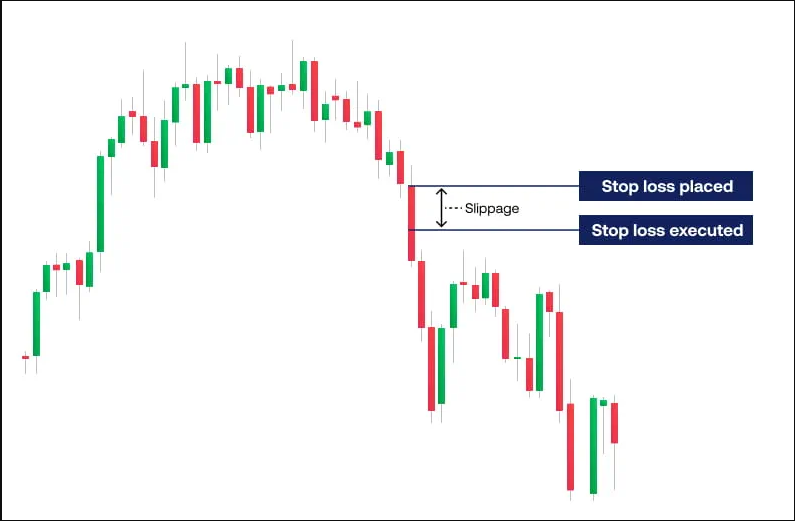
Negative slippage occurring when a Stop Loss order executes below the requested price level during a sharp market sell-off
- The Two Directions of Slippage:
- Positive slippage: Positive slippage means the order is executed at a better price than expected. For example, a buyer may get filled slightly lower than the displayed ask, or a seller may receive a slightly higher price than expected. While traders often focus on negative outcomes, positive slippage is a real part of live execution too.
- Negative slippage: Negative slippage means the order is executed at a worse price than expected. This is more noticeable in volatile or illiquid markets and around major news. It can increase loss size, reduce expected reward, and change the economics of short-term strategies that rely on tight entries or exits.
- Slippage across Market and Stop Orders:
- Slippage on market orders: Market orders are especially exposed to slippage because they prioritize execution speed over exact price. In normal conditions, the difference may be small. In thin books, fast moves, or leveraged products with sharp price swings, the difference can be meaningful enough to change the trade outcome.
- Slippage on stop orders: Stop orders can also experience slippage because once the trigger is reached, execution often happens at the next available price. This matters a lot for Stop Loss orders, since traders may believe they have fixed the risk precisely when they have only defined a trigger level. Gaps and sudden moves can create much larger exits than planned.
High-Impact Volatility Events
Slippage tends to increase around scheduled macroeconomic news releases (such as Central Bank interest rate news or employment data), market openings, and sudden announcements. Liquidity may thin out just as many orders arrive at once. This combination can lead to rapid price jumps where orders skip over intermediate levels, especially in forex, CFDs, futures, and crypto markets.
How to Reduce Slippage Risk
Slippage cannot be fully eliminated, but it can sometimes be reduced by choosing order types carefully, avoiding the most chaotic periods, trading liquid instruments, and using realistic position sizes. Traders should also understand that demo results may not match live slippage because demo environments may differ in liquidity, spreads, speed, and order handling.
- Use limit orders when price control matters more than guaranteed execution.
- Be cautious with market and stop orders during major news releases.
- Avoid oversized orders in thin markets.
- Check session liquidity before trading pre-market, after-hours, or off-peak periods.
- Review execution reports so you understand where slippage is happening.
Orders and Trading Costs
This section breaks down the structural and operational costs of trading, including bid-ask spreads, commissions, and overnight fees, and explains how they directly affect the total expense of executing an order.
Spreads
In every financial market, an asset does not have a single, unified price. Instead, it is governed by two separate, real-time quotes: the Bid and the Ask.
- The bid price: The highest price a buyer is currently willing to pay. This is the executable price available to you when you want to sell immediately.
- The ask price: The lowest price a seller is currently willing to accept. This is the executable price available to you when you want to buy immediately.
- The spread: The numerical difference between the Bid and Ask prices. This gap represents the transactional friction of the market and serves as the primary revenue mechanism for brokers operating without commission fees.
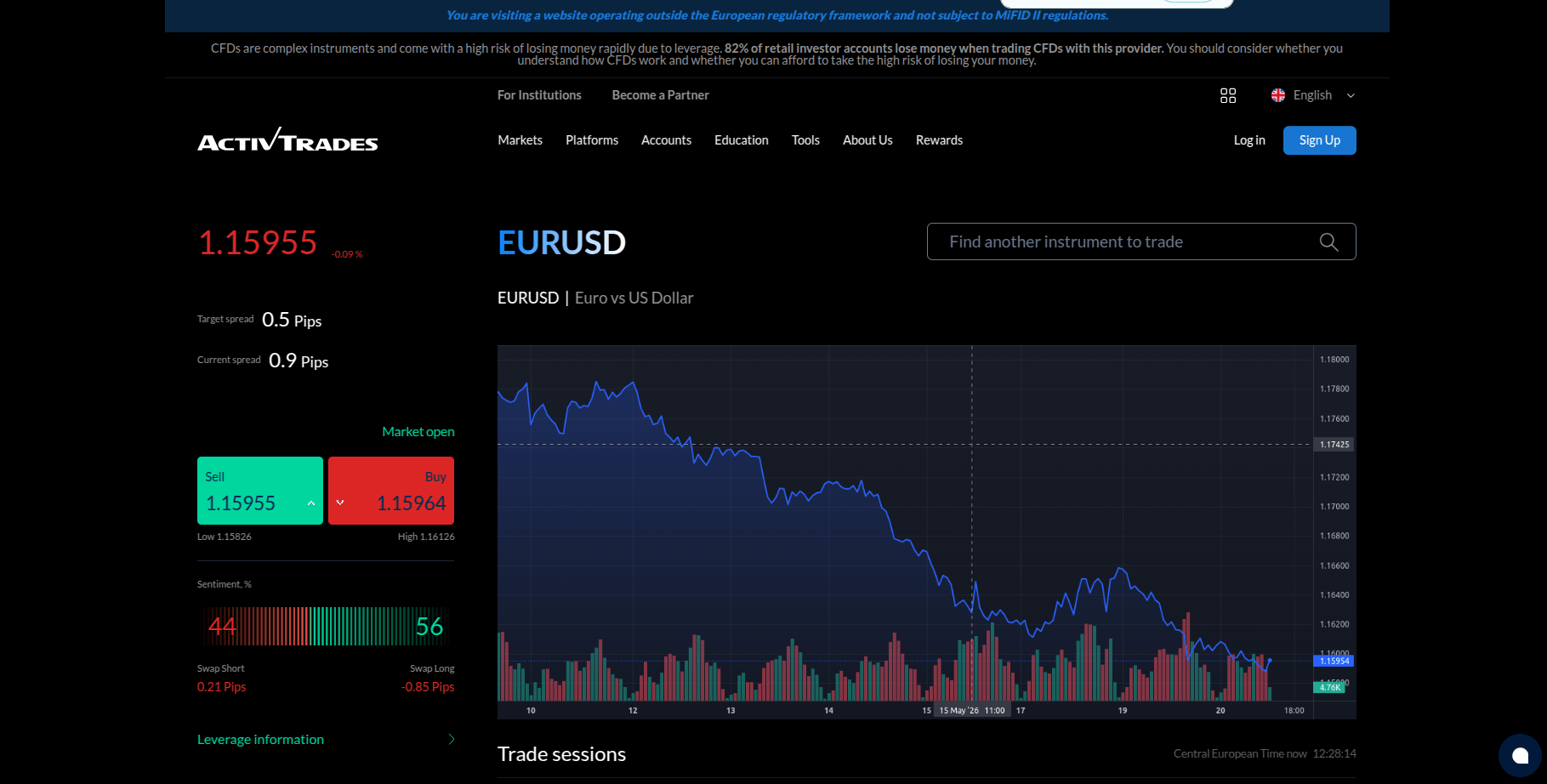
ActivTrades EUR/USD trading panel displaying live bid/ask pricing, target vs. current spread metrics, market sentiment, and swap rates.
Long and Short Order Entries
- Long entries (buy orders): When you execute a buy market order, you transact at the Ask price (the higher side of the bracket). However, to exit that trade immediately, you would have to sell at the Bid price (the lower side). Therefore, your trade starts at a loss exactly equal to the width of the spread.
- Short entries (sell orders): When you execute a sell market order, you transact at the Bid price. To close this position, you must buy it back at the Ask price. A short trade carries the identical spread disadvantage at inception, just inverted.
Spread Widening and Order Risk
Spreads are fluid and expand dynamically based on risk and liquidity conditions. Traders must maintain strict operational caution during these specific structural environments:
- Macroeconomic data releases: Immediately surrounding major news updates, liquidity providers pull their depth from the order book, causing spreads to balloon by 5 to 10 times their normal width within milliseconds.
- The session rollover: The final hour of the New York session and the opening minutes of the Asian session represent the lowest liquidity period in global banking. Spreads routinely widen dramatically during this transition window, triggering tight Stop Losses on resting overnight trades.
- Illiquid instruments: Exotic currency pairs, small-cap stocks, and minor cryptocurrency pairs feature permanently wider spreads due to a low volume of participants, making them highly punitive for short-term scalping models.
Commission Costs
 Some products or accounts may charge commission separately from spread, while others may reflect more of the cost inside the spread. The amount and structure vary widely, so traders should not generalize across brokers or products. The important point is that order planning should account for commission where it applies, especially in frequent trading.
Swap and Overnight Costs
 Holding positions overnight may involve financing, swaps, borrowing, or other carry-related costs, depending on the product. These do not affect the order entry itself, but they change the economics of how long a trade is held. Traders using longer durations should understand whether keeping the position open adds extra cost.
Guaranteed Stop Fees
 Where guaranteed Stop Loss orders are available, they may involve an added fee or premium, and the terms vary by broker and product. That cost may be worth paying in some high-risk situations, but it is not universal. Traders should assess it as part of the total planned trade cost, not as an afterthought.
Cost Differences by Order Type
 Order types do not change market costs in a magical way, but they do affect how those costs are experienced. Market orders may face more slippage, limit orders may avoid some poor fills but miss trades, and guaranteed stops may add direct fees where available. The cheapest-looking order on paper is not always the best in live conditions.
Order Types by Market
This section analyzes how order mechanics adapt across major financial instruments, highlighting the unique execution environments and structural risks native to each asset class.
Forex Order Types
Forex traders mainly use market orders, pending orders (limit and stop), Stop Loss orders, and Take Profit orders. Since forex trading is mostly conducted through OTC platforms, execution quality can vary depending on liquidity, volatility, and market conditions. Spread and slippage are especially important because even small price changes can affect trading results.
Forex Trading Orders
| Order Type | Purpose | Key Points |
|---|---|---|
| Market Orders in Forex | Commonly used for quick entry and exit, especially in major currency pairs where liquidity is often deeper during active sessions. | Fast execution, but slippage may occur during volatility or news events. |
| Pending Orders in Forex | Buy Limits, Sell Limits, Buy Stops, and Sell Stops are used to predefine entries without watching every tick. | These orders can help enforce discipline, but they are still affected by spread, trigger rules, and market conditions. |
| Stop Loss Orders in Forex | Stop Losses are a basic part of forex risk management because currencies can trend for long periods or spike sharply on news. | Ordinary Stop Losses are not guaranteed and may be affected by slippage, gaps between quoted prices, or spread widening in fast conditions, especially in leveraged forex positions. |
| Take Profit Order | Take Profits can help forex traders avoid second-guessing exits in markets that move constantly through the global day. | Helps automate exits and reduce emotional decision-making. |
Spread and Slippage in Forex Orders
Forex trading is highly sensitive to spread and slippage because many traders target modest price movements. A small extra cost can materially change the trade’s expected value. Around rollovers, illiquid hours, or high-impact news, both spread and slippage can change enough to trigger stops or spoil short-term setups.
Common Forex Order Mistakes
- Most charting software only displays the Bid price by default. Because buy orders execute on the Ask price, a short position can be stopped out even if the chart line never appears to touch your Stop Loss level.
- During the daily New York session close, institutional liquidity drops off a cliff for 30 to 60 minutes. Spreads balloon routinely by 5 to 10 times their normal size, triggering tight resting Stop Losses despite no actual change in the market trend.
- Paper trading environments feature infinite simulated liquidity and zero network latency. Strategies relying on tight market orders or trailing stops will frequently experience severe execution decay when transitioned to a live server.
CFD Order Types
Contract for Difference (CFD) platforms grant substantial leverage, meaning a minor execution fill mismatch can heavily penalize an account balance. To counter this, some retail brokers offer Guaranteed Stop Loss Orders (GSLOs). Unlike a standard Stop Loss, which instantly converts to a market order upon trigger and accepts whatever slippage occurs, a GSLO legally binds the broker to close your position at your exact designated price tier, completely blocking gap risk. However, brokers impose strict minimum distance requirements and charge a premium fee for this insurance.
Stock Order Types
When trading physical equities, your orders interact directly with a centralized public order book. This transparency means large orders are frequently executed as Partial Fills, where your position is filled in smaller fragments across multiple price tiers, potentially multiplying your transaction ticket costs. Furthermore, stocks are highly vulnerable to catastrophic opening gaps caused by off-hours corporate earnings results, rendering standard market opening entries highly unpredictable.
Index Order Types
Trading global stock indices (such as the S&P 500 or DAX) outside of their primary cash market hours introduces severe execution friction. When the underlying stock exchanges are closed, overnight index pricing is derived entirely from low-volume futures activity. To compensate for this drop in volume, brokers routinely double or triple their executable spreads during off-peak sessions. This artificial spread expansion can prematurely trigger resting Stop Losses on overnight positions, even if the core cash market never experienced a genuine structural breakdown. Furthermore, executing market orders right at the opening bell exposes traders to fragmented liquidity as individual constituent stocks open at slightly different millisecond intervals, causing localized price distortion.
Commodity Order Types
Commodities (such as Crude Oil or Gold) are heavily centralized assets tied directly to physical supply schedules and futures expiration timelines. This framework makes them uniquely vulnerable to abrupt “liquidity vacuums” surrounding high-impact reporting cycles, like weekly EIA inventory releases or OPEC headlines. During these split-second event windows, algorithmic liquidity providers routinely pull their resting orders from the central book to mitigate risk. Submitting a market or standard stop order into this sudden vacuum can result in devastating negative slippage. Additionally, because commodities track specific front-month contracts, traders utilizing Good ‘Till Cancelled (GTC) instructions face unexpected order purges or forced rollover position shifts if they fail to actively monitor the contract lifecycles.
Crypto Order Types
Crypto venues commonly offer market, limit, stop, and sometimes Stop Limit or conditional orders, but naming and trigger rules vary a lot. Because crypto can be highly volatile and trade around the clock, slippage and sudden price swings are major considerations. Beginners should be particularly cautious with leveraged crypto products and liquidation risk.
Futures Order Types
Futures markets usually support a broad range of order types through exchange-style execution, including market, limit, stop, Stop Limit, and various duration instructions. They can offer transparent order-book interaction, but they also carry contract-specific risks, expiration dates, and margin requirements. Fast futures markets can move sharply around data releases and contract roll periods.
Orders on Trading Platforms
Orders on MetaTrader 4
MetaTrader 4 (MT4) is widely used for retail forex and CFD trading, and it typically offers the core order functions beginners need: market orders, common pending orders, Stop Loss, and Take Profit. The exact order choices and restrictions can differ by broker and symbol. Traders should also remember that platform familiarity does not guarantee identical live execution across brokers.
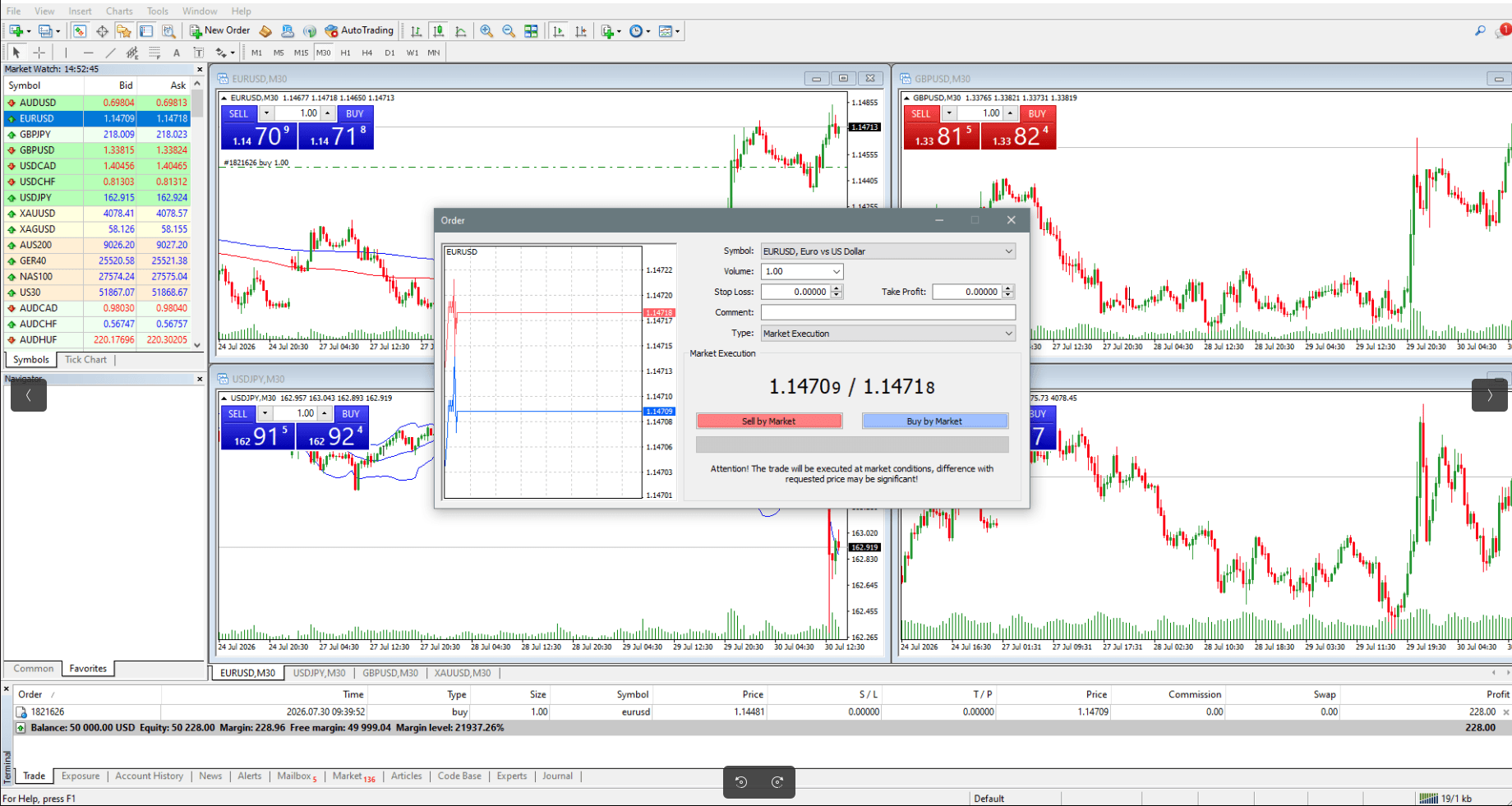
MetaTrader 4 order window demonstrating immediate Market Execution setup for EUR/USD with real-time bid and ask prices.
How to Place an Order on MT4
- Open the new order window: On MT4, the first step is usually opening the New Order window from the toolbar, chart, or market watch list. This brings up the order ticket where symbol, volume, Stop Loss, Take Profit, and order type can be set. The exact appearance may differ slightly by broker build, but the overall workflow is similar.
- Choose the symbol: Select the instrument you want to trade from the symbol field. Before placing the order, it helps to confirm the chart, session status, and whether the instrument is currently tradable. Beginners sometimes enter an order on the wrong symbol because multiple assets have similar names or abbreviations.
- Configure position size: Input your desired position size in the Volume field. On standard MT4 contracts, 1.00 represents a standard lot (100,000 units of the base currency), 0.10 is a mini lot (10,000 units), and 0.01 is a micro lot (1,000 units). Double-check your decimal placements here, as a simple typing error can accidentally scale your financial exposure by 10 times.
Establish risk boundaries: MT4 usually allows you to enter a Stop Loss level in the order ticket or modify it after entry. The stop should be placed where the trade idea is considered invalid, not at a random distance chosen only for convenience. Traders should remember that ordinary Stop Losses are not guaranteed and may be affected by slippage or gaps.
Take Profit level can usually be added in the same order window. This helps create a complete plan before the trade is live. If the field is left blank, the trade can still be managed manually, but that often leads to more emotional decision-making.
- Choose market or pending order: MT4 typically lets you choose between an immediate market-style order and a pending order. If you choose pending, you then select the pending order type and the entry level. Always check that the chosen order type matches the plan, such as Buy Limit below price or Buy Stop above price.
- Confirm the order: Before clicking to place the order, review the symbol, direction, volume, entry type, Stop Loss, and Take Profit. A final check can prevent many avoidable errors. In live trading, even a small typo in size or price can materially change the trade risk.
- Modify and close the order: After the trade is open or pending, MT4 generally lets you modify protection levels or close the position from the trade tab or chart. If a modification fails, possible reasons include invalid distances, fast markets, or market closure. Beginners should avoid constant changes unless the trading plan clearly allows them.
Orders on MetaTrader 5
MetaTrader 5 (MT5) generally offers a broader order-management environment and may support more order variations depending on the broker, market, and product. The interface is slightly different from MT4, so traders moving between them should not assume every menu behaves the same way. Always check the order type, expiry, and protection fields carefully before confirming.
The MT5 routing ticket incorporates advanced structural parameters, including specific fill execution policies and institutional expiry frameworks. The embedded real-time tick chart visualizes the immediate order book variance between resting Bid and Ask quotes. The execution commands adapt dynamically depending on whether the broker routes the order via Market, Instant, Request, or Exchange execution models. MT5 supports both hedging and netting and features built-in Depth of Market (DOM), displaying the order books, market liquidity, and pending bid/asks at different price levels.
Overall, for simple, straightforward trading, MT4’s order window is easier to use. However, if you trade multiple asset classes, MT5 provides advanced order flexibility.
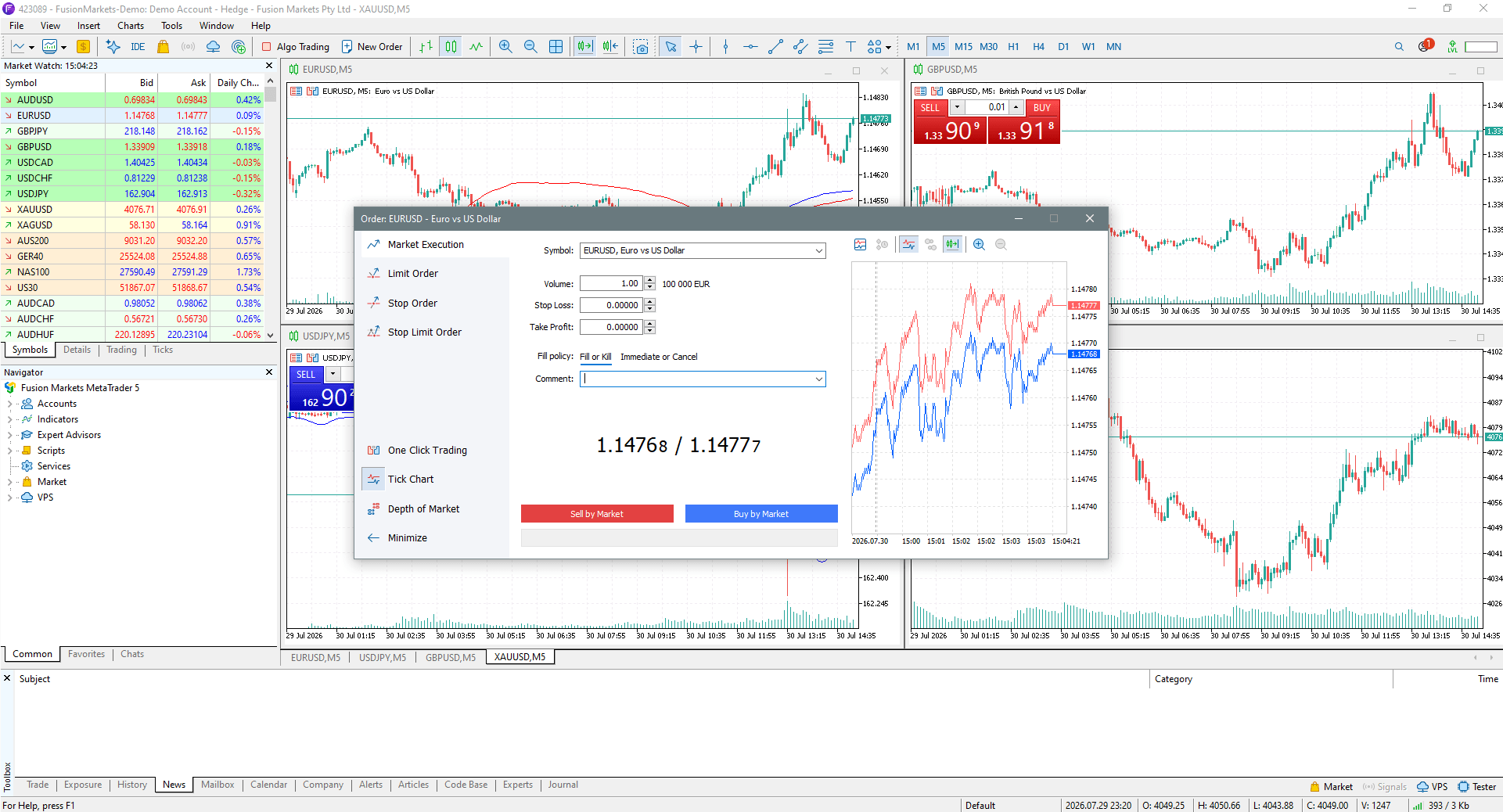
MetaTrader 5 order window demonstrating immediate Market Execution setup for EUR/USD with real-time bid and ask prices.
How to Place an Order on MT5
- Open the order ticket: In MT5, you usually begin by opening the order ticket from the toolbar, chart, or symbol list. The ticket is more flexible than many beginners expect, and it may include additional fields depending on the market and broker setup. It is still important to focus on the basics first: symbol, size, order type, and protection levels.
- Select the trading instrument: Choose the correct instrument from the symbol field and confirm that you are looking at the intended contract, pair, stock, or CFD. Because MT5 handles multi-asset classes, ensure that cash, contract for difference (CFD), and underlying futures variants of the same underlying asset are not cross-confused.
- Choose order type and configure position size:
MT5 usually provides multiple order choices, though availability can vary by instrument and broker. Selecting the correct type is critical because each one changes how price and execution are handled. While MT4 offers four types of pending orders (Buy Limit, Sell Limit, Buy Stop, Sell Stop), MT5 offers six types of pending orders. They include the four standard MT4 orders plus Buy Stop Limit and Sell Stop Limit.
Volume in MT5 defines the trade size and therefore has a direct impact on risk, margin, and sensitivity to price movement. A sound habit is to decide the amount at risk first and then work backward to the correct size. Entering size first and thinking about risk later is how many oversized trades happen.
- Establish protection levels: MT5 generally allows Stop Loss and Take Profit levels to be entered directly in the ticket for many order types. This makes it easier to build the exit plan before entry. Even so, traders should confirm that those fields were accepted and not left blank because of an invalid level or market rule.
- Set order expiry: For pending orders, specify the exact Fill Policy allowed by the broker’s execution gateway, such as Fill or Kill (FOK), Immediate or Cancel (IOC), or Return (permitting partial fills). Always double-check platform time zones so the order does not expire earlier or later than intended.
- Confirm the trade: Before confirming, review the instrument, direction, order type, volume, Stop Loss, Take Profit, and any expiry instructions. In terms of execution, MT5 includes an “Exchange Execution” mode, in addition to Instant, Request, and Market execution, which are available on MT4 too.
If using leverage, also consider the margin effect before sending the order. A careful pre-click review is one of the simplest ways to reduce avoidable trading errors. Select Buy by Market to execute a long entry at the immediate Ask price, or Sell by Market to route a short entry at the immediate Bid price.
- Manage the order after entry: Once the order is active, MT5 generally lets you modify levels, cancel pending orders, and close positions from multiple areas of the platform. The exact options may differ by symbol and broker. Traders should always verify that a modification has actually been applied rather than assuming the click succeeded.
Orders on cTrader
cTrader is built around a native No Dealing Desk (NDD) and Direct Market Access (DMA) architecture, prioritizing depth-of-market transparency and high-speed execution routing. A core differentiator of cTrader is its advanced graphical order ticket and integrated execution filters, which allow for strict control over trade matching and slippage.
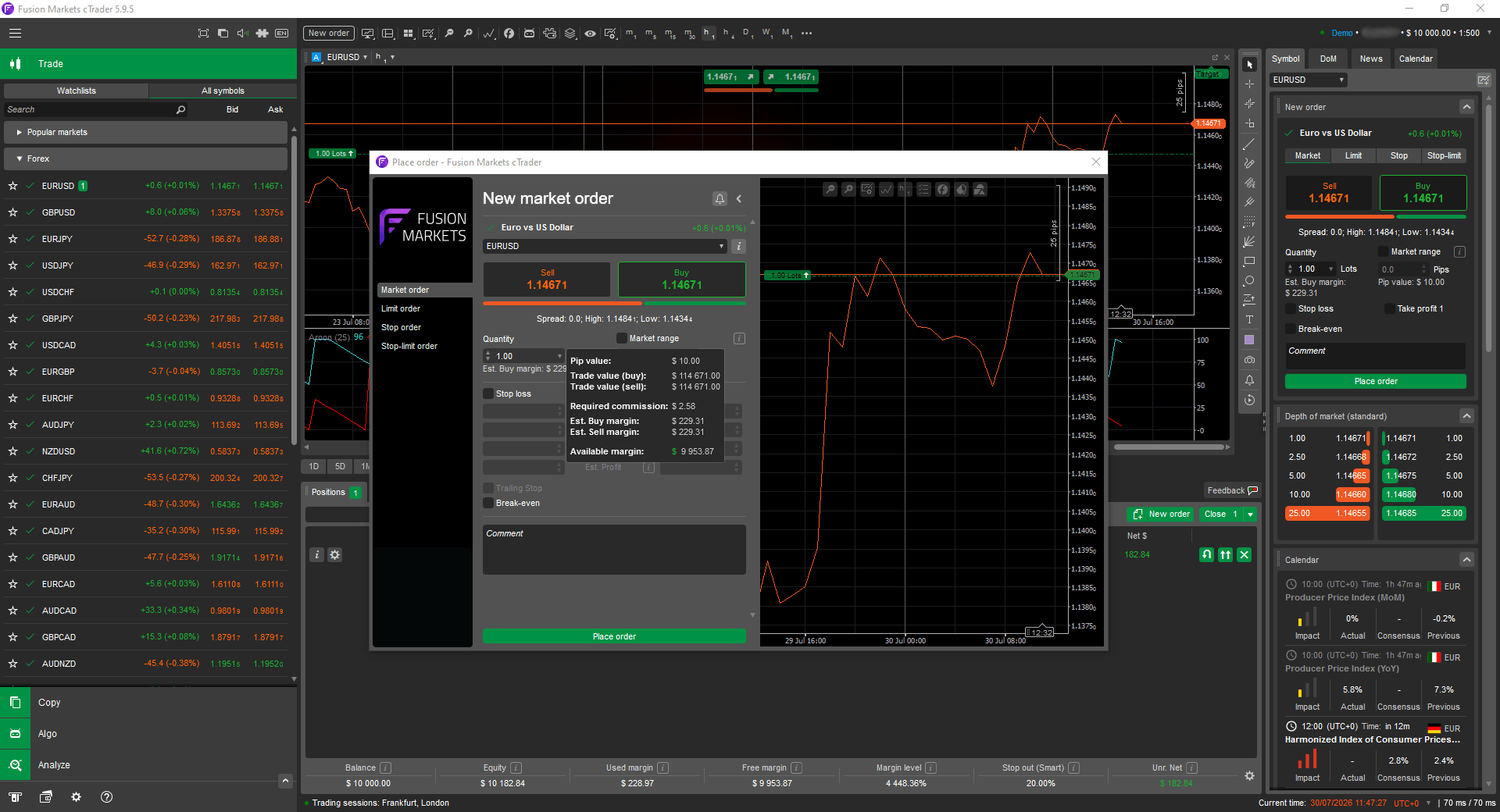
cTrader order window demonstrating Buy Market order for EUR/USD with real-time bid and ask prices.
How to Place an Order on cTrader
Opening the order ticket: The cTrader ticket combines pricing analytics and entry criteria into a single operational interface. A critical safety parameter unique to this environment is the Market Range toggle. Launch the transaction entry window by pressing F9 on your keyboard, clicking the New Order tool in the Trade Watch workspace, or expanding the Active Symbol Panel (ASP) on the right-hand side of the display.
QuickTrade features can make entries faster, which some traders like for active markets. The downside is that speed increases the risk of accidental orders if one-click features are enabled without proper confirmation settings. Beginners should be very cautious with rapid-entry tools until they are fully comfortable with the platform.
Choose Market, Limit, Stop, or Stop Limit: cTrader generally offers the core order types directly in the ticket or quick-entry menus. Choosing correctly matters because each type changes whether the trade enters now, on a pullback, or on a breakout. The exact order labels and additional conditions may vary by broker and product.
- Select asset and configure transaction volume: Confirm the target instrument ticker using the primary selection menu. Review the live transaction spreads, underlying leverage tiers, and current market session schedules before entering capital constraints.
Trade size in cTrader is usually entered in units, lots, or a similar format, depending on the market. However it is displayed, the key issue is risk. Traders should know how size interacts with stop distance, account balance, and leverage before confirming the order.
Establish protection levels: Activate the Stop Loss and Take Profit brackets. You can input parameters via Relative Protection (measured in pips from entry) or Absolute Protection (exact target price levels). The software calculates your precise cash risk, margin utilization, and risk-to-reward ratio in real-time before submission.
For volatile setups or illiquid market windows, enable the Market Range filter. Specify your maximum acceptable pip deviation to guard against execution gaps or severe Volume-Weighted Average Price (VWAP) degradation.
- Confirm the order: Before submission, review the full ticket and confirm the trade direction, size, entry method, and attached exits. This matters even more when using QuickTrade or mobile layouts, where mistakes can happen quickly. A brief pause before confirming can save far more time and stress later. Select the orange Sell button to target short execution at the current Bid price, or the green Buy button to target long execution at the current Ask price, routing the order immediately to the execution gateway.
- Manage open positions: After entry, cTrader generally makes it easy to adjust stops, targets, and pending instructions from the chart or position panel. Ease of adjustment can be helpful, but it can also encourage overmanagement. Traders should change orders because the plan changed for a valid reason, not simply because the price moved and emotions increased.
Orders on Proprietary Platforms
Many brokers provide their own proprietary platforms with custom order tickets, mobile-first layouts, or built-in analytics. These platforms may simplify common order placement, but the naming of order types and the workflow can differ from standard trading terminals like MetaTrader 4, MetaTrader 5, or cTrader. It is important to look for the plain-language meaning of the order, not just the button label.
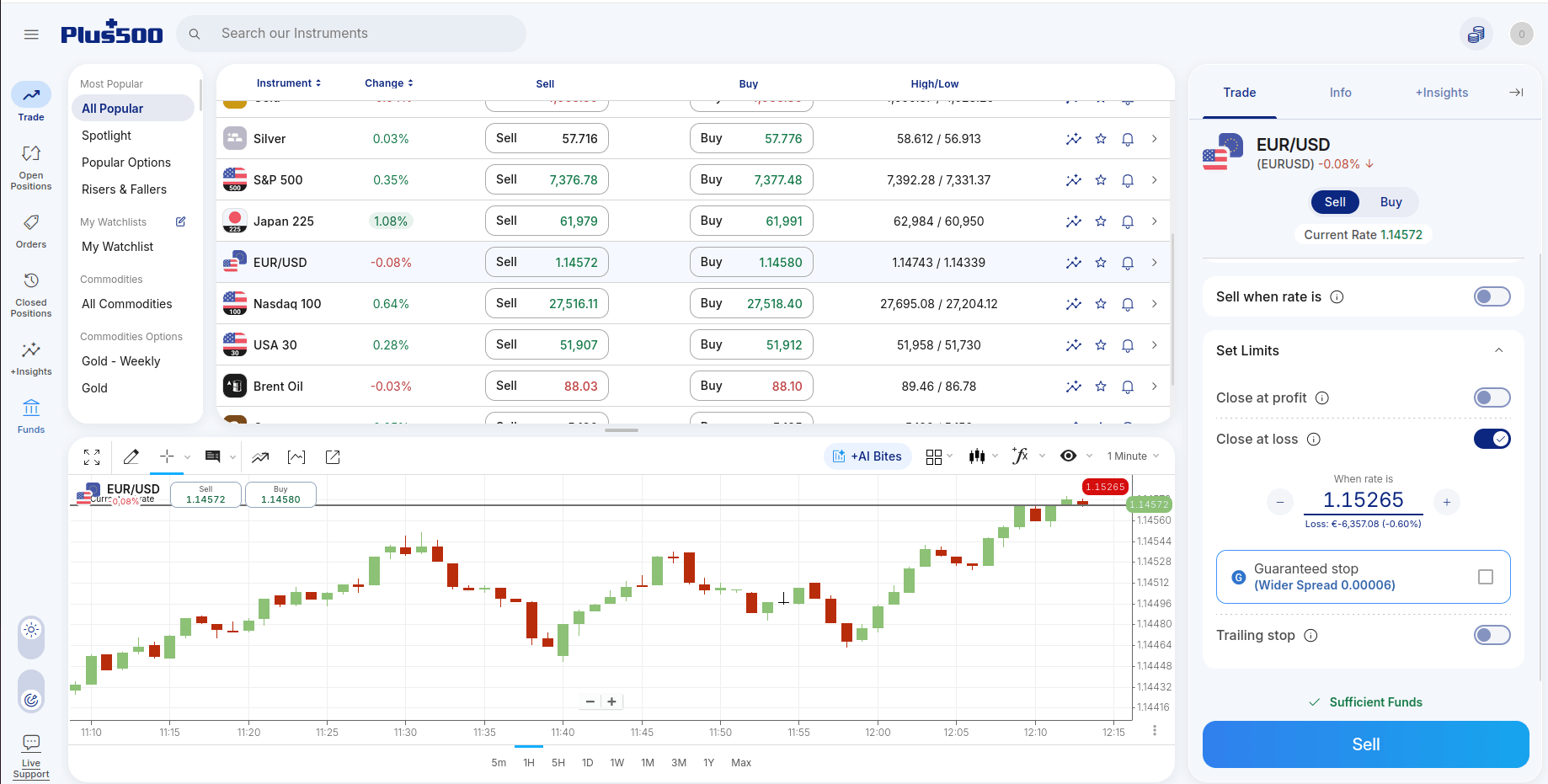
Placing a Guaranteed Stop on EUR/USD in Plus500 WebTrader, illustrating the additional spread premium required for execution assurance.
For instance, proprietary web platforms often integrate risk management options directly into the primary order ticket under non-standard terminology. A prime example is Plus500 WebTrader, where standard risk parameters are labeled using plain-language execution prompts:
- “Close at loss” functions as a standard Stop Loss order (subject to slippage).
- “Close at profit” functions as a standard Take-Profit limit order.
- “Guaranteed stop” serves as a server-side Guaranteed Stop Loss Order (GSLO).
How to Place an Order on Proprietary Platforms
Traders should familiarize themselves with the specifics of the proprietary trading platform they have picked. To use the example from the section above, we can outline the steps and requirements for placing a GSLO order at Plus500.
- Entry-Only Requirement: A Guaranteed Stop can only be attached when initially opening a new position. It cannot be added to an existing open trade after execution (though the target price level of an active GSLO can be modified).
- Additional Spread Premium: Because the broker guarantees execution at the exact requested rate regardless of market gaps or flash illiquidity, a wider spread (premium) is charged upon order placement.
- Minimum Distance Rules: The system enforces a mandatory minimum distance between the current market rate and the requested stop-loss price.
- Irrevocable Nature: Once accepted by the server, the guarantee itself cannot be removed or cancelled from the open position.
Orders on Web Platforms
Web platforms are convenient because they run in a browser and often mirror desktop functions reasonably well. However, some advanced features may be simplified, and speed can depend on browser performance and internet stability. Traders using web platforms should double-check that the attached Stop Loss and Take Profit fields are actually enabled before submitting the order.
Orders on Mobile Apps
Mobile apps make it easy to place and manage orders on the go, but small screens increase the risk of misreading size, price, or order direction. Mobile interfaces may also hide advanced fields behind extra menus. Beginners should be especially careful with market orders and stop adjustments on mobile, where a quick tap can change real risk.
Platform Differences in Order Types
Order types, partial-fill behavior, trigger logic, expiry settings, and modification rules vary by platform, broker, market, account type, and product type. A demo account may also handle execution differently from live trading because slippage, liquidity, speed, and emotional pressure are not identical. That is why traders should practice the workflow, but still stay cautious when moving from demo to live.
Order Lifecycle and Platform Mechanics
Let us now track the complete journey of a transaction from initial routing and margin allocation through the direct friction points of market execution.
Choosing the Right Order Type
Selecting an order type is a strategic decision that balances three competing factors: speed, price, and certainty of execution.
| Order Type Strategy | Primary Objective | Key Trade-Off and Risk | Optimal Market Application |
|---|---|---|---|
| Fast Entry (Market order) | Prioritizes immediate execution speed over price control during fast-moving market phases. | High exposure to execution slippage and spread widening. | Liquid, steady markets where execution certainty is paramount. |
| Price Control (Limit order) | Prioritizes exact entry/exit price parameters. | High non-execution or partial fill risk if the price misses the target. | Volatile instruments, patient entries, and distinct technical levels. |
| Breakout Trading (Stop order) | Automates entries only after price breaches a specific structural level. | High vulnerability to false breakouts, execution gaps, and sudden reversals. | Momentum setups and trend-continuation strategies. |
| Risk Control (Stop Loss orders) | Defines a fixed price threshold to automatically exit an adverse position. | Converts to a market order upon trigger; exit price is not guaranteed during weekend gaps or liquidity vacuums. | Essential across all asset classes to limit absolute capital downside on active trades. |
| Profit Targets (Take Profit) | Locks in realized capital systematically at a planned objective. | Trades may be closed before a larger move develops. | Maintaining structural trading discipline and removing emotional targets. |
Understanding these nuances is critical because a poorly chosen order type can lead to unnecessary costs, increased risk exposure, or missed opportunities during volatile market conditions. No single order is optimal for every scenario. Instead, traders must choose between these three competing factors.
Orders and Leverage
Leverage acts as a capital multiplier, increasing your market exposure relative to the cash committed. While it amplifies your purchasing power, it accelerates gains and losses at the exact same rate. Understanding how leverage interacts with your platform’s order system is the boundary line between controlled risk and account liquidation.
Margin Requirements Before Placing Orders
Before placing a leveraged order, traders should understand the margin required to open and maintain the position. Margin requirements vary by broker, market, product type, account type, and sometimes market conditions.
- Beginners often focus on how large a position leverage allows them to control, rather than how quickly that expanded volume can damage their absolute account equity.
- If you fail to verify your available free margin before hitting buy or sell, the broker’s system will immediately reject the incoming order due to insufficient funds.
Exit Brackets under Leverage
When trading with leverage, your bracket orders require much higher structural precision to handle the speed of equity fluctuations:
- Stop Losses are especially important on leveraged positions because a relatively small market move can translate into a large percentage change in account equity. But Stop Losses are not a substitute for proper sizing. An oversized leveraged trade can still damage the account badly if slippage occurs or if several positions move against you at once.
- Take Profits can help leveraged traders lock in gains before markets reverse, which is often useful when short-term moves are being traded. However, leverage can make profits feel larger than they are in percentage terms, encouraging early exits or overconfidence. A Take Profit level should still be based on the strategy, not on excitement.
Margin Calls and Forced Closures
If losses reduce account equity too far, a broker may issue a margin call or automatically close positions under its margin policy. This can happen even if the trader intended to manage the trade manually later. The exact thresholds vary, so traders should know the rules of their account before relying on any leveraged strategy.
Why Order Planning Matters More with Leverage
Leverage increases the cost of poor planning. A minor execution mistake, a too-tight stop, or a missed margin check can have a much larger account impact when leverage is involved. That is why leveraged trading requires careful position sizing, preplanned exits, and an understanding of how orders behave under stress.
Reducing Risk on Leveraged Orders
Risk on leveraged orders can often be reduced by using smaller sizes, avoiding overconcentration, placing realistic Stop Losses, and being cautious around news or overnight events. Traders should also avoid assuming that leverage is fully controlled just because a Stop Loss exists. Leverage can amplify both strategy strength and strategy weakness.
Order Fills and Partial Fills
An order fill is the actual execution of all or part of an order. It is the moment the market accepts the trade and turns the instruction into a real transaction. Depending on market depth, account size, and your chosen order type, routing an instruction results in one of three execution outcomes.
| Execution Status | Operational Definition | Primary Liquidity Trigger | Strategic Impact |
|---|---|---|---|
| Full Fill | The entire requested contract volume is executed at your target price or within acceptable slippage boundaries. | Abundant market depth; matching order flow is immediately available at your execution tier. | Standard outcome for retail volume in highly liquid assets; your net cost basis matches expectations. |
| Partial Fill | Only a fraction of the total requested volume is executed, leaving the remainder pending or canceled based on Time-in-Force parameters. | Insufficient matching volume at your specific price tier; common with large block orders or illiquid assets. | Leaves the position under-exposed; requires clear automated or manual rules to manage the unfilled residual balance. |
| Unfilled Order | The instruction remains resting on the order book as a pending command or is completely purged without executing a single contract. | The market never trades through your price boundary (limit orders) or encounters a total liquidity vacuum/disconnection. | A standard operational outcome for limit structures; must be factored into your strategy’s baseline expectancy rather than treated as a system error. |
What Factors Affect Fill Quality
- Liquidity and order fills: Liquidity is one of the biggest factors affecting fill quality. In deep markets, there may be enough resting interest to absorb orders with little price impact. In thin markets, a modest order may move through multiple price levels, causing partial fills or slippage.
- Market conditions and fill quality: Fill quality often worsens when volatility rises, spreads widen, or many traders try to enter or exit at the same time. Openings, closings, news releases, and unexpected announcements are common trouble spots. Traders should not judge their strategy only by chart entries if live fill quality differs materially.
What Traders Should Check After Execution
After any execution, traders should check the filled size, average price, remaining pending size, if any, attached Stop Loss and Take Profit, and the final effect on available margin. This simple review helps catch errors early. It also builds the habit of understanding actual execution rather than relying on assumptions.
Order Modification and Cancellation
Managing resting orders and active brackets requires strict adherence to system rules rather than real-time emotional reactions. Here is the operational framework for modifying and purging order parameters safely:
- Managing open and pending instructions:
- Active positions: Altering an open position’s parameters is restricted to adjusting attached protective Stop Losses, Take Profits, or trailing mechanisms. Every adjustment must stem from structural invalidation rules, never from discomfort with short-term price noise.
- A pending order can often be modified by changing its price level, size, expiry, or attached protection before it is triggered. This is helpful when market conditions shift slightly, but the setup still makes sense. If the original idea is no longer valid, canceling the order may be better than endlessly adjusting it.
- The mechanics of shifting brackets:
- Moving a Stop Loss is common in active trade management, but it should be done carefully. Moving the stop closer can reduce risk or lock in gains, while moving it farther away increases planned risk. Beginners should be especially cautious about widening stops after entry, since this often turns a controlled loss into a larger emotional one.
- Moving a Take Profit may make sense if the strategy calls for trailing targets, scaling out, or adapting to changing structure. But moving the target farther away simply because the market came close and then pulled back can become a form of undisciplined hope. The same applies to moving a target closer out of fear without a tested reason.
How to Cancel a Pending Order
To cancel a pending order, traders typically select it from the orders list and use the platform’s cancel or delete function. Before doing so, it is wise to check whether the order is linked to other orders or part of a larger setup. Canceling one leg without reviewing the rest can change the intended risk profile.
When Order Modification May Fail
Modification can fail for several reasons, including invalid stop distances, market closure, order already filled or canceled status, fast price movement, or platform connectivity issues. In some products, certain levels may be too close to the current market to be accepted. If a change fails, traders should verify the order status immediately instead of assuming the new settings were applied.
Risks of Changing Orders Too Often
Frequent changes can turn a structured plan into emotional micromanagement. They can also increase the chance of input mistakes, especially on mobile devices or fast charts. A useful rule is that if you cannot explain why an order change improves the original plan, it may not be an improvement at all.
Partial Closing and Scaling Orders
This section explains how to strategically adjust position sizing in stages through partial closing and scaling to secure profits and optimize risk control.
What Partial Closing Means
Partial closing means reducing only part of an open position instead of closing it entirely. For example, a trader may close half of a position at one target and leave the remainder open. This can be useful when you want to realize some gains or reduce risk without fully ending the trade.
On platforms that support it, partial closing is usually done by entering a smaller closing size than the full open size. The platform then reduces the existing position rather than opening a new one. Traders should confirm the remaining size afterward so they know exactly how much exposure is still active.
Partial closures can improve risk control by lowering exposure after a favorable move or after conditions become less clear. Some traders also move the Stop Loss on the remainder after taking partial profit, though this should follow a consistent rule. Random adjustments can create more confusion than protection.
Partial closing is not handled identically across all platforms, brokers, or products. Some platforms make it simple from the position panel, while others require a more manual workflow. Before relying on partial exits in live trading, it is wise to practice the exact process on the specific platform being used.
Scaling in vs. Scaling out
- Scaling in means building a position in stages instead of entering all at once. Traders may do this to improve the average entry price, add on confirmation, or reduce timing pressure. The danger is that adding to exposure can quietly increase total risk if each new order is not measured against the original plan.
- Scaling out means reducing a position in stages at different prices. This can help balance the desire to secure profits with the desire to stay in a longer move. The method works best when the exit stages are defined in advance rather than improvised while the market is moving.
Common scaling mistakes include adding to losing positions without a defined plan, taking partial profits so early that the strategy loses its edge, and forgetting to recalculate overall risk after scaling in. Another issue is leaving the remaining position without a stop because the trader feels “paid” by earlier profits.
Order Rejections and Requotes
Orders are rejected when the platform or broker cannot accept them under current rules or account conditions. Common reasons include invalid order placement, unsupported order type, insufficient margin, market closure, symbol restrictions, or protection levels that are too close. A rejection is often a useful signal that something needs to be checked rather than a reason to panic.
- Requotes: Requotes happen when the quoted price is no longer available, and the platform offers a new one instead. They are more common in fast conditions and on execution models that use quoted-price confirmation. For beginners, requotes are a reminder that displayed prices can change before an order is finalized.
- Invalid Stop Loss or Take Profit: An order may be rejected if the Stop Loss or Take Profit is placed too close to the current price, on the wrong side of the market, or outside the allowed rules for that instrument. This is a very common beginner mistake. Always check whether the platform has accepted the protective levels rather than assuming they are live.
- Insufficient margin: Insufficient margin means the account does not have enough available funds to support the new or modified position under current margin rules. This can happen even when the trader thinks the position looks small, especially on leveraged products or when other positions are already open. Margin needs vary by product, broker, account type, and market conditions.
- Market closed errors: Market closed errors occur when the instrument is outside its trading hours or temporarily unavailable. This can happen at weekends, between sessions, during holidays, or around scheduled market breaks. Some assets, such as crypto, may trade for longer hours than others, but even there, platform or symbol-specific restrictions can exist.
- Trade disabled errors: A trade disabled message generally means trading is not currently allowed on that symbol or for that account under current conditions. The reason may relate to the instrument, account permissions, temporary market status, or product availability. The exact meaning depends on the platform and broker, so reading the message closely matters.
How to Troubleshoot Order Problems
When an order fails, the best approach is to check the simple things first: symbol, market status, order type, volume, available margin, and attached Stop Loss or Take Profit levels. If the issue remains unclear, reviewing the platform journal or activity log can help. Acting methodically is far better than clicking repeatedly and creating more confusion.
- Confirm the market is open for the specific symbol.
- Check that the order type matches current price placement rules.
- Review margin and exposure before retrying.
- Verify Stop Loss and Take Profit distances.
- Check whether the order was partially filled, rejected, or requoted.
About the Editorial Team